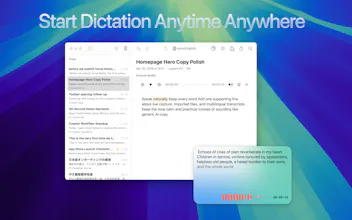
Private, local transcription for Apple Silicon Macs. Record or import audio/video, review with synced playback, add custom vocabulary, use Quick Dictation anywhere, organize and merge transcripts, and more. No cloud uploads or minute limits.
I built Vocal Notes because I wanted transcription to behave like a Mac tool, not an upload portal. The recognition work runs locally on Apple Silicon, and the transcript stays linked to the original recording so names, numbers, and quotes are easy to verify. It also handles file imports, custom vocabulary, folders, merging, Markdown export, and a global Quick Dictation window. One time payment with no recurring plan or transcription-minute limit. I would especially value feedback on the review workflow and the balance between a full transcript library and lightweight dictation.
Report
The local-only approach is a nice change of pace, and Quick Dictation actually feels snappy on my M2. I wish the custom vocabulary was easier to manage, but overall it nails the basics without forcing me into a subscription.
Report
Runs smooth on my M2 and the synced playback is genuinely handy for catching missed words in interviews. Love that nothing leaves the machine.
Report
Finally tried this on my M2 and the local transcription feels surprisingly snappy, especially with custom vocabulary. Synced playback while editing is a nice touch.
Report
How does the accuracy hold up with accents or noisy backgrounds since everything runs locally on-device?
Report
how does the custom vocabulary actually work in practice, do i just type in a list of words and it picks them up automatically or is there some training step involved
Report
runs entirely offline on my m2 mac and the custom vocabulary actually catches my weird project names correctly, super refreshing
Report
No reviews yetBe the first to leave a review for Vocal Notes
ChatGPT Finder
The local-only approach is a nice change of pace, and Quick Dictation actually feels snappy on my M2. I wish the custom vocabulary was easier to manage, but overall it nails the basics without forcing me into a subscription.
Runs smooth on my M2 and the synced playback is genuinely handy for catching missed words in interviews. Love that nothing leaves the machine.
Finally tried this on my M2 and the local transcription feels surprisingly snappy, especially with custom vocabulary. Synced playback while editing is a nice touch.
How does the accuracy hold up with accents or noisy backgrounds since everything runs locally on-device?
how does the custom vocabulary actually work in practice, do i just type in a list of words and it picks them up automatically or is there some training step involved
runs entirely offline on my m2 mac and the custom vocabulary actually catches my weird project names correctly, super refreshing