All-in-one battery monitor for Windows: Bluetooth, 2.4GHz, AirPods, controllers, mice, and keyboards. Live tray icons per device, custom alerts, full customization.
No reviews yetBe the first to leave a review for VisoDyne Battery Monitor
Maker
📌
Hey Product Hunt! I made VisoDyne Battery Monitor.
My headphones would start beeping mid-use because the battery was almost dead, and by that point it's already too late. Windows shows battery levels for some devices now, but it's pretty hidden and there's no warning before they die. My DualShock controller was the same, it would just start blinking right before running out, so I'd have to stop early. And AirPods don't show battery info on Windows at all.
So I built one app to fix all three.
Some of the features:
One app for everything, no need for separate tools per device (AirPods, controllers, Bluetooth and 2.4GHz devices)
Estimated percentages for devices that only report in 10% steps, plus estimated time remaining (takes a little while to kick in since the app needs to learn your battery usage first)
Low-battery alerts, something Windows doesn't offer at all
Runs lightweight in the background
There's now a free Community version, plus a one-time €6.99 license for the full feature set, no subscription. There's also a 7-day free trial of the paid version. I just put this out publicly, so I'm actively adding features and improving device compatibility. If a specific device isn't detected correctly or something's off, there's a feedback option built right into the app, I'd love to hear about it.
Report
The per-device tray icons are a really thoughtful touch, makes it so much easier to glance at exactly what's low without digging through a menu. Curious how it handles Bluetooth devices that drop and reconnect throughout the day.
Report
Maker
@burakalnta71tv Thanks! If a device only reports in 10% steps, it saves the estimated percentage, say 44%, and when it reconnects while still in the 40% range, it just continues counting down from there. By default, disconnected devices lose their tray icon but still show up in the battery monitor as disconnected. All of this is configurable though, you can keep the tray icon if you want, or hide disconnected devices from the monitor entirely. If nothing is connected, it just shows the white VD logo.
Report
Been waiting for something that handles Bluetooth and 2.4GHz devices in one place, this looks promising. One idea though: add a small log or history tab showing recent battery drain rates per device, so you can spot which controller or mouse is degrading faster than the others over time.
Report
Maker
@rhastekkes51150 Thank you! That's a good idea, I was actually already thinking about adding a chart for your battery, similar to what you'd see on your phone. The data is already being tracked for the time estimates, so adding this on top is planned.
Report
honestly the tray icons are a nice touch but it would be cool if you could add a quick stats popup on hover, like percentage and estimated time left without needing to open the full window. basically just a glance at remaining battery right from the taskbar, you know
Report
Maker
@fahrixa6n This one's already in there :) Hover over any tray icon and you'll get a tooltip with the device name, battery percentage, and estimated time remaining, something like "Sony WH-1000XM5 - 48% (6h 34m left)
Report
A history log per device would be really useful, like being able to see battery percentage over the past week so I can spot which headset or mouse is draining faster than it should. Would make troubleshooting way easier than just guessing.
Report
Maker
@atakankudak Thanks for the suggestion, something like this is planned. My first focus was just getting as many devices reporting accurately as possible, now that's in a good place I want to build out more functionality on top. The battery data is already being tracked, so this will make it much easier to add later.
Report
Finally something that shows my AirPods and Xbox controller on the same tray without juggling three apps. The per-device alert thresholds were a nice touch, saved me from a dead mouse mid-meeting.
finally one app that shows all my wireless devices in the tray instead of digging through settings, and the per-device alerts actually saved me when my mouse hit 5%.


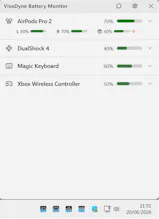


Hey Product Hunt! I made VisoDyne Battery Monitor.
My headphones would start beeping mid-use because the battery was almost dead, and by that point it's already too late. Windows shows battery levels for some devices now, but it's pretty hidden and there's no warning before they die. My DualShock controller was the same, it would just start blinking right before running out, so I'd have to stop early. And AirPods don't show battery info on Windows at all.
So I built one app to fix all three.
Some of the features:
One app for everything, no need for separate tools per device (AirPods, controllers, Bluetooth and 2.4GHz devices)
AirPods left/right/case battery reported separately, fully configurable (merge, hide, or split icons)
Xbox and DualShock controller support
Estimated percentages for devices that only report in 10% steps, plus estimated time remaining (takes a little while to kick in since the app needs to learn your battery usage first)
Low-battery alerts, something Windows doesn't offer at all
Runs lightweight in the background
There's now a free Community version, plus a one-time €6.99 license for the full feature set, no subscription. There's also a 7-day free trial of the paid version. I just put this out publicly, so I'm actively adding features and improving device compatibility. If a specific device isn't detected correctly or something's off, there's a feedback option built right into the app, I'd love to hear about it.
The per-device tray icons are a really thoughtful touch, makes it so much easier to glance at exactly what's low without digging through a menu. Curious how it handles Bluetooth devices that drop and reconnect throughout the day.
@burakalnta71tv Thanks! If a device only reports in 10% steps, it saves the estimated percentage, say 44%, and when it reconnects while still in the 40% range, it just continues counting down from there. By default, disconnected devices lose their tray icon but still show up in the battery monitor as disconnected. All of this is configurable though, you can keep the tray icon if you want, or hide disconnected devices from the monitor entirely. If nothing is connected, it just shows the white VD logo.
Been waiting for something that handles Bluetooth and 2.4GHz devices in one place, this looks promising. One idea though: add a small log or history tab showing recent battery drain rates per device, so you can spot which controller or mouse is degrading faster than the others over time.
@rhastekkes51150 Thank you! That's a good idea, I was actually already thinking about adding a chart for your battery, similar to what you'd see on your phone. The data is already being tracked for the time estimates, so adding this on top is planned.
honestly the tray icons are a nice touch but it would be cool if you could add a quick stats popup on hover, like percentage and estimated time left without needing to open the full window. basically just a glance at remaining battery right from the taskbar, you know
@fahrixa6n This one's already in there :) Hover over any tray icon and you'll get a tooltip with the device name, battery percentage, and estimated time remaining, something like "Sony WH-1000XM5 - 48% (6h 34m left)
A history log per device would be really useful, like being able to see battery percentage over the past week so I can spot which headset or mouse is draining faster than it should. Would make troubleshooting way easier than just guessing.
@atakankudak Thanks for the suggestion, something like this is planned. My first focus was just getting as many devices reporting accurately as possible, now that's in a good place I want to build out more functionality on top. The battery data is already being tracked, so this will make it much easier to add later.
Finally something that shows my AirPods and Xbox controller on the same tray without juggling three apps. The per-device alert thresholds were a nice touch, saved me from a dead mouse mid-meeting.
@burcubitgen Love hearing that already :)
finally one app that shows all my wireless devices in the tray instead of digging through settings, and the per-device alerts actually saved me when my mouse hit 5%.