No reviews yetBe the first to leave a review for Video to Clips
Hunter
📌
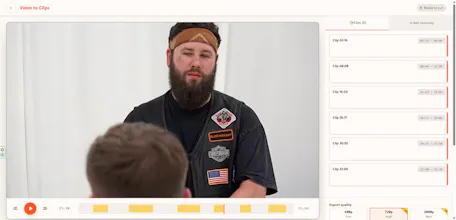
Video to Clips is a free online video cutter and video trimmer that helps users split videos into multiple clips quickly and easily. The platform is built for content creators, YouTubers, TikTok creators, podcasters, educators, marketers, and anyone who needs to create short videos from long recordings.
With Video to Clips, you can cut videos online, trim unwanted parts, create short clips for YouTube Shorts, TikTok, Instagram Reels, Facebook, and other platforms without downloading or installing any software. Everything works directly in your web browser, making the editing process fast, secure, and accessible from any device.
Whether you are editing podcasts, webinars, tutorials, interviews, gaming videos, or social media content, Video to Clips provides a simple and efficient solution for creating professional-quality clips online. The service is free to use, requires no registration, and is optimized for speed, ease of use, and high-quality video processing.
Report
The no-registration approach is genuinely refreshing, especially since most video cutters bury the actual trimmer behind signups and paywalls. Clean execution and a fast workflow.
Report
It would be great if the tool could export directly to vertical formats like 9:16 for TikTok or Shorts, so I don't have to reformat clips in another app after trimming.
Report
Took it for a quick spin on a long recording and the trimming was surprisingly smooth, no lag or watermark nonsense. Really like that it just works straight from the browser.
Report
Really handy that it works without an account, just uploaded an mp4 and had three clips ready in under a minute. Clean, no fuss.
The no-registration approach is genuinely refreshing, especially since most video cutters bury the actual trimmer behind signups and paywalls. Clean execution and a fast workflow.
It would be great if the tool could export directly to vertical formats like 9:16 for TikTok or Shorts, so I don't have to reformat clips in another app after trimming.
Took it for a quick spin on a long recording and the trimming was surprisingly smooth, no lag or watermark nonsense. Really like that it just works straight from the browser.
Really handy that it works without an account, just uploaded an mp4 and had three clips ready in under a minute. Clean, no fuss.