Launching today

VibeRes
Menu bar resolution switcher for macOS with live preview
4 followers
Menu bar resolution switcher for macOS with live preview
4 followers
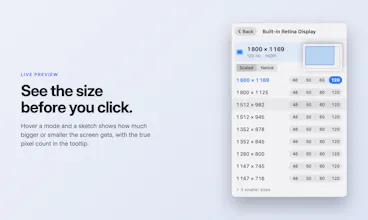
VibeRes is a free, open-source resolution switcher for the macOS menu bar. Every connected display and all its scaled and native modes are one click away. Hover a mode to see how much bigger or smaller the screen gets before you switch. Save multi-display profiles like Work, Code or Presentation and run them from Shortcuts, Siri or the viberes CLI. Native SwiftUI, signed and notarized, installs with Homebrew. A successor to EasyRes, which is no longer maintained.



Hi Product Hunt,
VibeRes started as a replacement for EasyRes, a menu bar resolution switcher that is no longer maintained. System Settings can change resolution too, but it takes too many clicks when you move between a laptop screen, an external monitor and a projector.
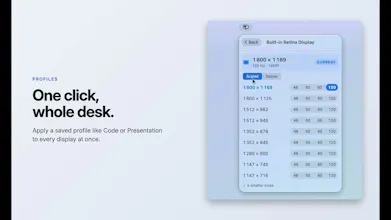
VibeRes sits in the menu bar and shows every connected display with its current mode. Hover a mode and a small sketch shows how the screen size changes before you click. Profiles save a whole multi-display setup, and a Presentation profile can match whatever projector you plug in. Profiles also work from Shortcuts, Siri and the viberes CLI.
It is free and open source (MIT), native SwiftUI, signed and notarized. Install with Homebrew:
brew install --cask m-moravcik/viberes/viberes-app
It runs on macOS 26 Tahoe and later. Feedback and bug reports are welcome, especially from people with unusual display setups.
Michal