Verbz

Create tasks, notes, and chat, with your voice

7 followers

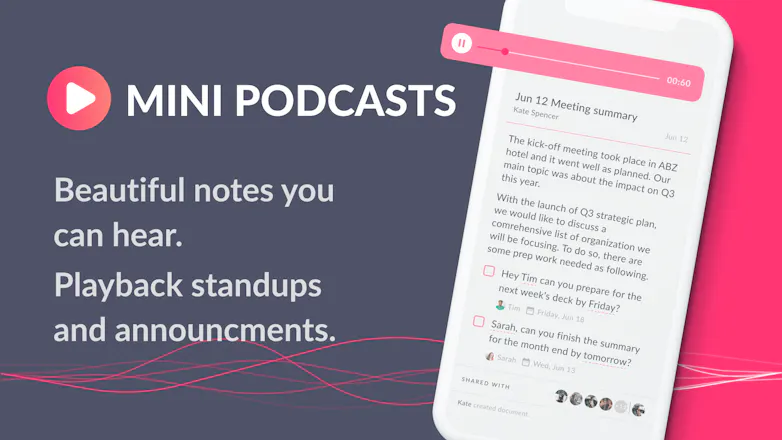
Verbz is a voice productivity app for teams. Create notes, assign tasks, make announcements, run standups, or just chat. Talk or type, listen or read.
Verbz gallery image
Verbz gallery image
Launch Team
AppSignal
AppSignal
Get the APM insights you need without enterprise price tags.
Promoted

What do you think? …

Stuart Eggerton
I feel like when i first got invited to gmail LOL This is a buttery smooth experience to add tasks and more using my voice. Bonus points because it understands my international accent so well! Looking forward to using more! Thanks makers 😊
dexter zhao
@stuart_eggerton Thanks for trying it out Stuart! Yeah with our international team, even though everyone speaks english it theres it still a challenge to get the accents right!
Matt Laurie
@stuart_eggerton Wow, thanks Stuart! As we're a globally distributed team, you can imagine that this is very important to us [1]. People should not feel forced to talk like a machine to work with voice, we want to allow you to talk with your team as naturally as if they were in the same room. One of the more magical advances in speech recognition recently is the availability of more accents for languages. It's not really that long ago that even my Australian accent couldn't be understood but now it's nearly flawless. The more this accuracy improves for everyone, the more I'm really excited about what we can build with Verbz! [1] Our current distributed team record is having the team spread out across 7 countries - and that was nearly one each :)
Hugh Geiger
@stuart_eggerton Thanks Stu, really appreciate your feedback!
Kevin David
Very interesting.
Matt Laurie
@kevin_david_k Thanks Kevin!
dexter zhao
@kevin_david_k thanks! take it for a spin and let us know whats working and whats not! We'd love to hear [voice message in the app? ;) ] your feedback!
Kevin David
@dexter_zhao Sure, I will let you know.
Sarrah
This looks interesting. I have a few questions: 1. can this be used as a personal tool or does it have to be used with teammates? 2. what's the cost? i see a promo code for PHUNT but it says free on the website 3. is there a limit to the length of voice recordings that can be saved?
Matt Laurie
@sarrah Thanks for the questions Sarrah! 1. Can definitely be used a personal tool - recording notes or assigning tasks to yourself is definitely supported. If you do have to share a note or assign a task with an external user, we allow you to just send them what you create over email 2. We're free to download. We're currently scaling up as we add more users so the promo code is just making sure that the people who join early can add their friends too. Everyone who signsup now will have access to a personal invite code that they can use too! 3. There's no technical limit to how long you can record. For example, one of our early users is using Verbz to create a recording of himself reading a book :) re voice length, a useful feature we have implemented is the append button. This lets our user take a pause between recordings and the end result is still a continuous piece of audio. So they only need to hold the record button when they're actually talking - don't need to say everything in one breath!
Hugh Geiger
@sarrah Hey Sarah, thanks for your questions. 1. A lot of people are using it by themselves for notes and to-dos. It also works great with smaller team , like if you work with 1 or 2 other people. We're not trying to replace Slack for huge operations teams, we want highly mobile or highly personal teams to communicate and manage their work better. 2. Some people are using it for voice diaries. Not an intended use case, but we're stoked that people find it a painless way to capture thoughts (playback on notes got delayed.. next week!) 3. What you see/try today is 🔥free🔥 and won't be paywalled. We have some pro tiers coming that will include advanced features. We want to be useful free or paid 4. Promo code is used as we've been invite only beta, and want to to be able to slow adoption if necessary. It will morph into a friendly friend code as we reach product maturity. Pricing TBD, we're still learning about how people use voice and where it fits into their day.
Kenny Wong
@sarrah @geigster That's a good way to capture the essence of Verbz. "We're not trying to replace Slack for huge operations teams, we want highly mobile or highly personal teams to communicate and manage their work better."
David Ryan
@sarrah @geigster The transparency you and the team seem to have is amazing. Keep it up. Makes it so much easy to move my team over reading clearly what you're doing and intend to. I also LOVE that you're real people, not cartoon characters (like a lot of the "note taking" products seem to be lately).
Zobair H
Congrats! Can't wait for Android. Question, how is this better than leaving normal audio messages on WhatsApp?
dexter zhao
@zobair Thanks zobair! thats a good question - one of the advantages is that sending audio messages is easy but listening to them is hard! You have to either be alone in a quiet place or find headphones. You can't preview the message before listening to it, people ramble because audio is so easy to record. So did the best of both worlds, we made it easy to record but also easy to consume. You can just read their message at your own pace, and if it is too much to read you can listen at anytime!
Kenny Wong
@zobair Agree with @Dex that being unable to preview audio messages is a pain when you want to quickly scan through the feed and cherry pick which ones to respond to when you're in a rush.
Hugh Geiger
@zobair Search! Everything gets transcribed :)
Mykhaylo Kostandov
Beautiful, smart, and timely! Good work team. Hyped to try it out! A couple quick questions: - How are the team relationships defined and kept current? Do we need to create and maintain teammate links, or can we map an existing org structure and keep that in sync? - Is the whole meeting recorded as one shot? Can I clip a specific part of a meeting? Askingforafriend ^_^
dexter zhao
@miheyk thanks Mykhaylo! - For now our organizing structure is relatively loose, we've built verbz in a way that you can get work done with anyone - both inside and outside of your org (as long as you have their email, you can create in verbz and it will be shared with them even if they're not a verbz user). At the moment the structure that we have in place is Spaces, which is basically an individual workspace for a topic/project that you and your team can define and manage members within. As we get more feedback from our users and their teams on what they need, we will explore ways to manage those connections easily. We'd love to hear more about your thoughts on this topic though as we're always looking to see what our users need. - we're less about recording the whole meeting and only recording the things that are important to the meeting. It is possible to record the whole meeting but we don't think thats useful since someone will have to go through the whole transcript. We think that during certain points of the meeting or immediately after the meeting, we decide what are key points and action items and we want to allow users to quickly record those parts! more than happy to chat more about these decisions
Hugh Geiger
@miheyk Thanks Mykhaylo! You can create Spaces - aka channels with specific members and docs (a bit like teams) or you can do things dynamically straight from your contacts list. - We don't record meetings - just the stuff you want to remember or to do. We may offer integrations with some excellent meeting recording tools in future. When we dug into the meeting recording space, we found the strongest use case was a 'safety net' - a backup of a conversation. We are focusing on workflow and dictation. D you want to log into asana, or pull out your phone and say "Hey Hugh, do that thing for me". You're doing that today, just with a notepad or a gdoc.
Mykhaylo Kostandov
@geigster @dexter_zhao thanks guys, both decision points make total sense, and I wish more tools (and people in general, ha!) emphasized just the important, salient, AND actionable elements of meetings like y'all do. Self-managed teams ought to work well for small-to-midsized groups, especially in cases where not everyone is within the same domain—this works well for Slack, after all. Will share more thoughts later on as our team has a chance to try this out in the wild!
Armine Saidi
Ive been looking for such a product for a while - well done. Can it assign tasks based on the meeting note? Automatically? Whats the process? Or do i need to trigger it somehow with a command?
Hugh Geiger
@armin_s thanks Armine! Tough questions! Verbz has a sprinkling of smart automation right now. It looks for tasks and relationships. So if we work together, and I mention your name it will try to guess if I'm asking you to do something and spin up a task. It will get smarter! 😁 So during a meeting you can say quickly assign to multiple people (or yourself) "Hey Hugh, get the website ready for producthunt, lets schedule a review for Wednesday" It will tag me and assign a task. "Matt, export the mailing list to get ready for the welcome update". <-- tags Matt ✨ "Follow up with Claire on the social media outreach" <-- tags you! ✨ When you hit save, everyone gets tasks in their todo lists, and you keep your notes :)
Matt Laurie
@armin_s Thanks! For tasks in Verbz you can hold down the record button and say (something like): "Hey Matt, I need you to update that design document by 3pm tomorrow" Verbz will then detect that: 1. You are creating a task 2. The task is for a person named "Matt" 3. The task is due at "3pm tomorrow" If you have a contact "Matt" who is a Verbz user then they will get a push notification that they have a new task with a due date, if not a Verbz user then we let you enter an email address for us to send them the task to their inbox.
David Ryan
@armin_s @mlaurie This might be a nerdy thing to say, but I'm really impressed seeing a CTO so succinctly describing how something works. I can only imagine how much "smarter" this workflow will get over time.
Hugo Augusto
Love how easy it is to use and how fast it is to sync with my team at Semapa Next. I have been using it for awhile and it is super efficient. I’m also using it to mentor founders and to do portfolio management with dedicated spaces for the companies I invested in while at Techstars (20+ Teams). Fantastic job Hugh, Matt, Dex, Claire and the entire team at Verbz 👌🙌👏
Hugh Geiger
@hugolisbon Thanks Hugo, really appreciate your support. We'd not be at launch day without it!
Matt Laurie
@hugolisbon Awesome, thanks Hugo! Definitely wouldn't be here without your support!
dexter zhao
@hugolisbon Thanks hugo, we wouldn't have been able to build our team in lisbon with your support!
123
•••
Next
Last