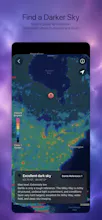
Velastar is a native iOS sky atlas built with Metal and a testable Swift astronomy core. Point your iPhone at the real sky, explore 8,002 Hipparcos stars and all 88 constellations, move through time and location, or change your observing world entirely. Land on the Moon, Mars, or Europa to see local horizons, solar time, planets, and moons. It also includes a 3D Solar System, offline object guides, Milky Way planning, light-pollution tools, world clocks, and six astronomy widgets.
Hi Product Hunt! 👋 I’m the independent maker behind Velastar.
I started with a childhood question: what am I actually looking at when I raise my eyes to the sky? That question grew into a much bigger one—what would the sky look like if the observer were standing somewhere other than Earth?
Velastar is my answer. It is a native iPhone and iPad astronomy app built with UIKit, Metal, and a pure Swift astronomy core. You can explore a real-time sky with 8,002 Hipparcos stars, all 88 modern constellations, the complete Messier 110 catalog, the Sun, Moon, planets, and a fully interactive 3D solar system.
The part I’m most excited to share is the observing-world system. Move from Earth to the Moon, Mars, or Europa, choose a surface location and time, and watch the local sky rebuild around you. From the Moon, Earth hangs over the horizon. From Mars, Phobos and Deimos cross the sky. From Europa, Jupiter dominates the view while the other Galilean moons move around it.
I also wanted Velastar to be useful outside the “wow” moment. Its photography workspace combines sunrise and sunset direction, golden and blue hours, Milky Way core altitude and azimuth, moonlight, an offline light-pollution reference, and a three-month Milky Way window forecast. The core calculations and catalogs run locally on the device.
This has been the most beautiful and technically demanding product I’ve built. The hard part was never drawing more stars—it was making astronomy, rendering, interaction, and product design agree with each other while keeping the experience calm enough for a beginner.
I’d love your honest feedback on two things:
1. Which mode would you open first: the live Earth sky, an alien world, the 3D solar system, or photography planning?
2. What would make an astronomy app earn a permanent place on your home screen?
3. Before I reveal the story behind them, what do you think the name “Velastar” and its icon are meant to represent?
Thank you for looking up with me. ✨
MissTime