
Vaultiqo
The password manager for Google Workspace teams
16 followers
The password manager for Google Workspace teams
16 followers
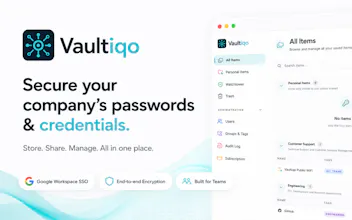
Vaultiqo is a password manager built for Google Workspace teams. Teams share passwords in Docs, Sheets, and Slack not because they ignore security, but because most tools are built for individuals, not teams. Vaultiqo fixes that: secrets are team-owned, access follows your Workspace groups, everything is encrypted client-side, and Google SSO replaces the master password. Plus just-in-time access, one-click offboarding, and a browser extension that autofills, generates, and saves passwords.



The Google Workspace angle is smart, especially tying access to existing groups so onboarding and offboarding stay aligned. One thing I'd love to see is a way to require an approval step before anyone in a group can reveal a password, even if their group technically has access. Useful for jump accounts and shared social logins where you want a second set of eyes on every use.
@berkay135520 Thanks! I really like that idea.
We already have a concept of separating view and edit permissions, but introducing an approval workflow for revealing particularly sensitive credentials is an interesting use case. Especially for privileged accounts, production systems, or shared social media accounts.
It’s not something Vaultiqo supports today, but feedback like this is incredibly valuable because it comes from real operational scenarios rather than hypothetical feature requests. Thanks for sharing it!
honestly the google workspace integration sounds really solid, but one thing that would make it a no brainer for us is granular sharing inside docs and sheets specifically, like letting you embed vaultiqo credentials directly into a spreadsheet cell that auto updates if the password rotates. right now we still end up copying and pasting which kind of defeats the purpose
@ceylinarbaivif Thanks, really appreciate that!
That’s a very interesting idea. Our current Google Workspace integration focuses on authentication and team management, but deeper integration with Docs and Sheets is definitely something we’ve discussed internally.
The challenge is balancing convenience with security, since exposing credentials directly inside documents needs to be handled very carefully. That said, I completely agree that reducing copy & paste is one of the biggest opportunities to improve the workflow.
Thanks for the suggestion. It’s exactly the kind of real-world feedback that helps shape the product roadmap.
the Google Workspace focus is honestly smart, most password tools just feel like they were bolted onto teams as an afterthought. one thing that would actually sell me is shared folders or projects inside the vault, so my dev team can group credentials by client instead of scrolling through one massive list. basically how 1Password does it but tied to Workspace groups. would make onboarding new folks way less painful
@sat697155427106 Thanks! That was actually one of the main design goals from the beginning.
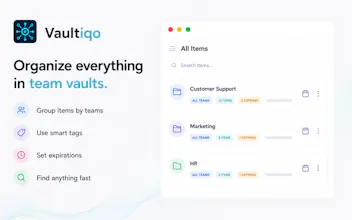
Vaultiqo already supports organizing credentials into Groups, so teams can separate passwords by client, project, department, or any other structure that makes sense. Permissions are then managed at the group level, which makes onboarding and offboarding much simpler than sharing credentials one by one.
Native synchronization with Google Workspace Groups isn’t available yet, but it’s something we’re actively considering because it would make administration even smoother for Workspace-centric organizations.
Really appreciate the suggestion. It aligns well with the direction we want to take the product.
Really glad someone is tackling team password sharing inside Workspace, the Docs and Slack passwords situation is painfully relatable. One thing I'd love to see is granular sharing expiry, like setting a shared credential to auto-revoke after a project wraps or a contractor's contract ends, so nothing lingers in someone's autofill forever.
@sradfzq Thanks, and yes, the Docs-and-Slack situation is exactly what set this off.
Part of what you describe is already in: group access can be time-limited. You add the contractor to the group that holds the project's credentials, set an end date, and it revokes itself. It is enforced on the next request rather than by a nightly job, so there is no window where the deadline has passed but the access has not. The date is visible to both the person and the admin, so it is not a silent timer either.
That also covers the autofill part. The browser extension reads the same permissions as the app, so the moment access lapses the credential stops being offered. Nothing to clean up on the client.
What is not there yet is an expiry on a single item shared directly with one person. Today you would model that as a group, which works but is heavier than it should be for one credential and one contractor. Fair gap, and a good argument for closing it. We'll put it in the next release this week ;)
Public share links do have both an expiry and a view limit, if you ever need to hand one secret to someone outside the company.
Tying access to Workspace groups instead of a separate permission system is such a smart move — no more drift between who has access to what in Google and who can actually open a credential.
@raziyepplf Exactly! That’s one of the key reasons we’re exploring it.
For organizations already using Google Workspace groups as the source of truth for access management, having Vaultiqo automatically reflect those memberships would reduce administrative overhead and help avoid permission drift between systems.
It’s not available today, but it’s high on the list of ideas we’re evaluating. Thanks for highlighting the use case!
New version is live, and a good chunk of it came straight out of this thread.
@sat697155427106 @raziyepplf Google Workspace group sync shipped. Vaultiqo now
reads your Workspace groups and mirrors their membership, so the group that
already decides who is on a project also decides who can open its credentials.
Google's Owner, Manager and Member map directly onto ours. Every sync runs
behind a preview, so you see exactly what will change before it happens,
including when a group with the same name already exists. Both of you framed it
as removing the drift between two systems rather than as a convenience, and that
is the argument that moved it up the list.
@sradfzq Per-item share expiry is in, as promised. You can put an end date on a
single credential shared with one person, without modelling a whole group for
one contractor. Enforcement is the same as the group version: it lapses on the
next request rather than whenever a nightly job runs, so there is no window
where the deadline has passed but the access has not.
@berkay135520 You raised oversight on the use of privileged credentials, jump
accounts and shared logins where what matters is who actually opened something.
That thinking landed in this release. Every time a secret leaves the server it
is recorded, the item itself shows who opened it last, and autofill by the
extension is recorded separately, so someone deliberately revealing a password
is never buried under a hundred routine logins.
Thank you, all of you. This thread shaped the release more than our own backlog
did.