Unscript

Unscript

Run npm scripts using automatically shortened script names

0 followers

Run npm scripts using a couple letters instead of a couple words.
Unscript gallery image
Free
Launch Team
Framer
Framer
Launch websites with enterprise needs at startup speeds.
Promoted

What do you think? …

Jacob Shuman
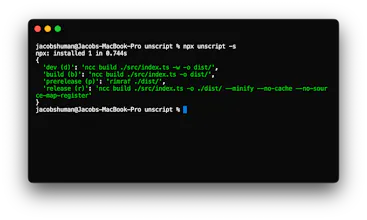
Hey everyone this is my first product on Product Hunt 🎉. Checkout unscript on: NPM: https://www.npmjs.com/package/un... GitHub: https://github.com/jacob-shuman/... I love to create a lot of npm scripts per project, especially on larger projects, so that i don't need to memorize several repetitive commands to accomplish a task. The names for each script often get longer as the project gets larger. I try to create explicit script names including a separator to make it easier to read when visually scanning through my package.json for a specific script. For a while i've though some of these scripts could be accessed much easier using short aliases. For example serve:web -> sw netlify:deploy -> nd etc... I would create these aliases on my projects manually as separate npm scripts when necessary how this solution was not scalable. I found other solutions such as those that involved migrating my scripts to a separate js file however I wanted to keep my scripts in my package.json. After some research I wasn't able to find anything that resembled closely what I wanted and thus Unscript was born. The tool does feature a few options that be referenced in the README on GitHub or using the -h/--help option. Essentially the tool grabs the first letter of each script name separated by a separator string (":" by default) and concats those character(s) into the alias. So if you wanted to run serve:web you would simply run the tool using the expected alias (sw). As is stated in the README, Unscript can be run using npx and I encourage you to alias it on your shell. I use "un" for "npx unscript" and "una" for "npx unscript -a" (the -a/auto option runs the script without confirmation). The project is completely open to any ideas that you may have and I encourage you to create an issue or discussion on GitHub! I'm planning on working on it so long as I and the rest of the community are interested in advancing the tool. Please let me know if you have any questions or ideas in the comments, I would be more than happy to answer any/all of them.