
Unfollow Checker
See who unfollowed you on Instagram and Threads. No login
8 followers
See who unfollowed you on Instagram and Threads. No login
8 followers
Find who unfollowed you and who doesn't follow you back on Instagram and Threads. No password — your data export is processed locally in your browser.


Free
Launch Team / Built With


LightfieldAI-native CRM that builds itself and does work for you
Promoted
Hey Product Hunt 👋
I'm Andrii, a solo dev from Ukraine.
I got curious about who'd unfollowed me and went looking for a tool. Every single one wanted my Instagram password, or an OAuth scope that could post on my behalf.
Unfollow Checker runs on the official data export Meta is legally required to give you.
How it works:
Request your archive: Instagram → Accounts Center → Your information and permissions → Download your information. Choose either JSON or HTML.
Meta emails you a .zip. Usually fast, but it can take a while for bigger accounts.
Drop that .zip on the page. Done.
You get:
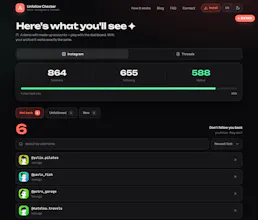
→ who unfollowed you
→ who never followed back
→ who's new
→ Instagram and Threads, from the same archive
No password. No OAuth. No account. No upload. Everything is parsed in your browser.
One honest catch: Instagram doesn't include unfollow history in the export, so your first run is just a baseline. Export again in a few weeks and you'll see exactly who left.
There's a demo on made-up data: https://unfollowchecker.com/demo. It won't tell you anything about your own account, it just shows the interface and what the result looks like.
Free, no signup.
Drop your requests in the comments — I'll be around.
Love that everything runs locally — actually trust tools like this way more. One thing I'd kill for: a way to see when someone unfollowed me over time, not just a current snapshot, so I can spot patterns like who ghosts after big posts.
@lkercmt2 Appreciate that — not wanting your password was the whole idea from the start.
The nice thing is, it already supports tracking changes over time: save your current export as a baseline, then upload a newer one later, and it'll show you who unfollowed you since then, along with a trend chart. Each snapshot is tied to its export date, so the more regularly you export your data, the more accurately you can narrow down when someone unfollowed.
The only thing I can't provide is the exact moment someone unfollowed you. Instagram simply doesn't expose that information.
So it all comes down to comparing snapshots: if someone appears in an older export but is missing from a newer one, they unfollowed you sometime between those two exports. If you export your data right after a big post, that time window becomes small enough to get a pretty good idea of who disappeared.
Processing everything locally in the browser is a smart call, especially since asking for an Instagram password these days feels like a scam waiting to happen. Nice work on making something useful without the sketchy trade-offs.
@dceteli47457 Appreciate that, Dilan. That was exactly the balance I was trying to hit: useful enough to answer the question, without asking for a password, OAuth access, or storing anyone’s data.
The export flow is a little less “instant”, but I think it’s the safer trade-off for this kind of tool.