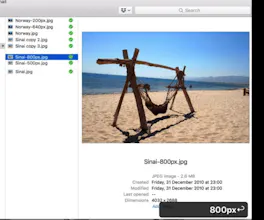
Unagi is a small Mac application. It resize images when you change the filename. if you add 100px to image filename Unagi will resize it to 100px width automatically. Works with any custom image size in any folder on your Mac
Ok, this is very interesting and smart but...in the video you "forgot" to add the step where you have to right click the image and start the service. This make everything less magic. Also because you have to go 1 by 1, you can't select multiple images and start the service for all of them.
@mrdobelina hi Filippo! Thanks for reaching out. I have it written one the landing page in the features section so you will not miss it.
Also you can select multiple images and apply resize mode to them. If you look on the video it works for both images without applying resizing one by one. I’ll check it again to make sure there is no bug.
@ilya_libin Hi! Yes I saw it in the landing page, after I purchased it. But in the video is missing, which I think is one of the first thing someone see and make the decision to buy it. Anyway, mmm I tried again to select 4 images and right click to service them all but it only create a copy of the first image.
@mrdobelina I assumed that everybody passes via Landing page before buying as there is no option to buy from the video. I'll add this instruction to my video as well. Thanks for pointing to this, Filippo!
@ilya_libin Well I landed on the page, clicked "How it Works", saw the magic and bought it! Have you figured out the multiple images issue? It's me missing something or it is a bug?
Hi Hunters! I'm Ilya developer of Unagi - a small utility app that allows you to resize images to any width by renaming it. Sometimes you need to upload a profile image or create custom Slack emoji or whatever but you find out that the image is too big and you have to resize it. I think that you shouldn't be required to open your photo editor to be able just to resize an image - it's just too time-consuming action.
I was experimenting with user experience and found out that this would be the shortest action you need to do: just add an amount of pixels to the filename and BOOM - Unagi will resize it automatically. Works like a charm!
UPDATE: THE ISSUE WITH BULK IMAGES SOLVED: you will get the newest fixed version to your inbox when purchasing!
Like it? Here is 40% discount coupon just because you are the part of this amazing community!
+++++++++++++++++++++
UNAGI_PH
+++++++++++++++++++++
Report
@ilya_libin No Windows version? I see that Windows is coming for Picpipe, same for Unagi?
Very clever idea, I can see how it could be super useful. I don't use the standard Finder though, and it doesn't seem to hook into PathFinder - I have no idea how much work that would be but would love to hear if you ever hook them up. Thanks and congrats on the launch
@petejacobson Hi Peter! If you have an access to the right-click services context menu from PathFinder then it will work. Unagi is listening to filename updates and act if it recognize the pattern of pixels added, like 100px 123px 3456px and whatever. I’m pretty sure it will work.
Report
@ilya_libin doesn't show up there for me, unfortunately :(


Tailry
Agave Health
Tailry
Agave Health
Tailry
Agave Health
Agave Health
Agave Health
Hovercode
Agave Health
Agave Health
LiveChat
Agave Health
Humans Not Invited