
Pocket Screen
Keep any Mac window visible in a floating mini screen
313 followers
Keep any Mac window visible in a floating mini screen
313 followers
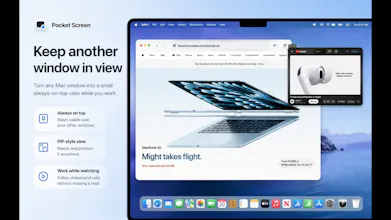
Pocket Screen turns the frontmost window on your Mac into a compact, always-on-top PiP-style view. Keep documents, chats, videos, or reference material visible while you work in another app—without constantly switching windows. Processing stays on your Mac.


Love that processing stays local on the Mac, keeping a floating reference window in view without shipping my screen contents to the cloud is exactly the privacy first touch that makes this genuinely usable for real work.
@ilko_kacharov Thanks, Ilko! Exactly—Pocket Screen processes the window capture locally on your Mac and does not upload your screen contents to the cloud. Keeping it private and practical for real work was an important part of the design.
the reference-without-switching use case is the one i'd actually use this for. keeping docs or a video call pinned in a corner while i work in the main window, no alt-tab dance. simple, but that's a real daily annoyance solved
@alex_watson2110 Thanks, Alex!
That’s exactly the kind of everyday workflow Pocket Screen was designed for—keeping a document, reference, or video call visible while staying focused on the main window.
Glad to hear the use case resonates with you!
Love how it just keeps processing local on your Mac instead of bouncing stuff to the cloud. The always-on-top window feels really well done too, super smooth when you're dragging stuff around.
@zcan1758563 Thank you, Özcan!
Keeping the processing local and making the floating window feel smooth and lightweight were both important goals, so I’m really glad you noticed that.
Working off one laptop screen is basically my whole day, so keeping something in view while I get on with other things speaks right to me. Simple and genuinely useful, Masaki.
@melodie_sh Thanks so much, Mélodie!
That single-laptop-screen workflow is exactly what Pocket Screen was made for. I’m really glad it resonates with you.
So, if I understand correctly, this is mainly for beginners? On a Mac, I can switch between windows almost instantly using keyboard shortcuts...