Launching today

TONAUT
Synth, drums, sequencer and 8-track tape for iPhone and iPad
8 followers
Synth, drums, sequencer and 8-track tape for iPhone and iPad
8 followers
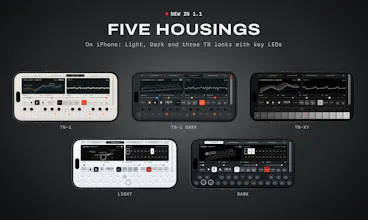
Tonaut is a synth, drum machine, sequencer and eight-track tape for iPhone and iPad, made to be played rather than programmed. 9 synth engines, over 500 sounds, 41 drum kits, a chord pad, 16 effects and an eight-lane sequencer. On iPhone, five housings with key LEDs. $19.99 - one-time purchase for iPhone and iPad. No subscription, no account. AUv3 is coming in 2.0, free.




Hi Product Hunt, I'm Richard. I run Coast Creative, a small studio that designs websites and makes its own apps for Mac and iPhone.
I've always loved small hardware instruments, the kind where every key does something and you're making music a minute after you switch them on. Most music apps I tried felt like the opposite: menus first, music later. So I built the instrument I wanted to carry around. Tonaut is one panel that plays like hardware, on the iPhone or iPad you already have, with no subscription and no account.
Tonaut is on the App Store now:
• 9 synth engines, from virtual analog and six-operator FM to wavetable, grains and a sampler, with over 500 sounds
• A chord pad: seven chords from your key, and a stick that turns each one into a 7th, 9th, sus and more
• 41 drum kits, or make one from your own recordings
• 8 sequencer lanes, 16 patterns each, with step recording from the screen or a MIDI keyboard
• 16 effects, from tape echo and a minute-long reverb to pump and lo-fi
• An eight-track tape you can loop, reverse, stutter and brake
• MIDI in and out, stem and MIDI file export, and sharing a whole song with a friend or a loop as a video
• A 3D screen for every engine, and on iPhone five housings, three of them with an LED in every key
AUv3 is in the works too. It's version 2.0, expected in the next 2 to 3 weeks, so you can run Tonaut inside AUM, GarageBand and Logic Pro for iPad. It's a free update.
It's $19.99, paid once, and one purchase covers iPhone and iPad.
I'd love your feedback: what feels good, what feels off, and what you'd want next. I'm here all day to answer questions.
Do the stems export as WAV? I'd want to drop a loop straight into a Resolve timeline.
one panel and no account before making a sound sounds like the right starting point for a pocket instrument
looking forward to seeing how the auv3 version fits into that same flow