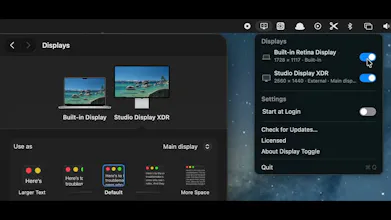
Display Toggle lets you disconnect or reconnect built-in and external Mac displays from the menu bar. Disabled displays remain one click away, and the app prevents you from turning off your only active screen. It also manages display audio, supports Start at Login, and works on Apple silicon and Intel Macs running macOS 13+. Try every feature free for 14 days; then pay $5 once—no subscription.
Hi Product Hunt! 👋
I built Display Toggle because switching between a MacBook screen and external displays should not require digging through Settings or unplugging cables.
From the menu bar, you can disconnect or reconnect any built-in or external display in a click. Disabled displays stay available for quick reconnection, and the app prevents you from disabling your only active screen.
I also added thoughtful details that matter in everyday setups: audio follows your active displays, Start at Login, universal Apple silicon/Intel support, and an emergency shortcut to restore inactive displays.
It’s free to try for 14 days, then $5 once—no subscription.
I’d love to hear how you manage your display setup, and what would make Display Toggle more useful for you. Thanks for checking it out!