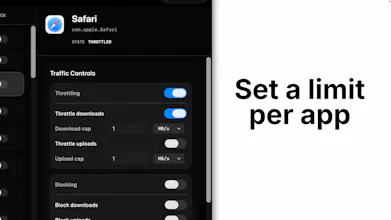
Throttlr is a native macOS utility that shows which apps are using your connection, then lets you limit or block their upload and download traffic individually. Unlike monitors that only report usage, Throttlr applies real-time per-app speed limits and shows your traffic history. Processing stays on your Mac, and the free download includes a 14-day Pro trial with no account or credit card required.
No reviews yetBe the first to leave a review for Throttlr
Viktor.comAn AI coworker that actually does the work
Promoted
Maker
📌
Hey Product Hunt! 👋 I’m Justin, the maker of Throttlr.
I started building Throttlr after repeatedly running into two frustrating situations: sometimes one Mac app would quietly consume most of my connection, and other times my internet would suddenly feel slow but I couldn’t tell which app was causing it.
Most network monitors could show me traffic, and firewalls could stop an app completely, but I wanted something in between: quickly find the app responsible, limit just that app, and let everything else keep working normally.
Throttlr lets you:
- Monitor live upload and download activity by app
- Set separate upload and download limits
- Block an app’s traffic when needed
- Apply controls to individual apps or to the whole system’s internet and local network traffic
- See how speeds have changed over the last five minutes
The part I’m most excited about is how immediate it feels: set a limit, toggle throttling, and watch the app settle at that speed.
Privacy was also important to me. Traffic contents, browsing activity, and per-app network statistics stay on your Mac.
Throttlr requires macOS 15 or newer. It’s distributed as a signed and notarized package and uses a macOS network system extension, which macOS asks you to approve during setup.
There’s a free monitoring tier, and every new installation includes a 14-day Pro trial without an account or credit card.
Thanks for checking it out—I’ll be here throughout the launch to answer questions and hear your ideas.