Stop wasting your best hours replying to emails. The Reply Project reimagines the entire inbox clearing process. View all your emails open on one screen and type quick replies β or use templates or ChatGPT for even faster responses.
Hi!
I'm Ajay. I get a ton of email but I've always hated the native Gmail workflow for replying to email.
The Reply Project is the first tool ever to focus solely on replying to emails, and making replying the best experience possible.
I built The Reply Project to be a complete and total reimagining of how we work through our inboxes responding to emails. One that works even better than the Gmail interface itself.
I've heard countless people tell me how long it takes them to respond to their emails every day. How they have to block off an hour or more of their most productive, most valuable hours to respond on emails. And how it feels like that time is going to waste.
With The Reply Project, that whole "responding to emails" process takes a fraction of the time.
In fact, you can get through your inbox 10x faster.
Here's how.
When you log into The Reply Project, you'll see:
- All the emails in your inbox open on one screen
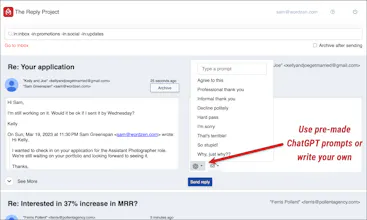
- A box next to each email where you can type in a quick reply
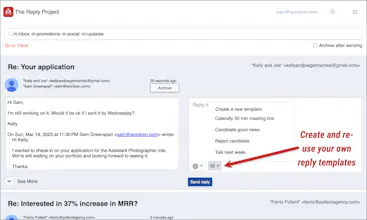
- An option to create or use your own templates for even quicker replies
- An option to use ChatGPT to write a response for you
- A button to send the reply, which then minimizes (and optionally auto archives) that message so you can move on to the next one
The friction of the email reply process is completely gone. There's no clicking to open an email, then clicking the button to reply, then typing in a message (or using Chrome extensions to help type in the message). Everything is on one screen and designed to make the process as smooth as possible.
And... itβs free for everyone.
Who this is for:
- Anyone who has to respond to a handful of emails (or more) every day
- Anyone running cold email campaigns or other email marketing campaigns
- Anyone running a job search, internal comms, or any other scenario with high volumes of incoming email
Gmail and Google Workspace users
Things this cannot do yet:
- You can't add attachments to your replies yet.
- You can't use non-Gmail services yet.
- If you have multiple "from" addresses set up in your Gmail account, you can't change the reply to be from a different address yet.
I hope you get a ton of fantastic use out of The Reply Project!
If youβre interested in more details, check out our blog post: https://www.gmass.co/blog/the-re...
And to get started, go to: https://gmass.co/reply
Finally, you may have heard of GMass, which is a Gmail extension for sending email campaigns. GMass users get The Reply Project natively built into their dashboard, making it super easy to reply to replies to their email campaigns.
This is a great tool for productivity! Would love to see an integration with scheduling software to quickly set up meetings without having to switch between multiple platforms.
Good morning! Kudos on getting The Reply Project on PH! π It looks awesome! I've got just one inquiry. What was the most difficult part of the process?
GMass