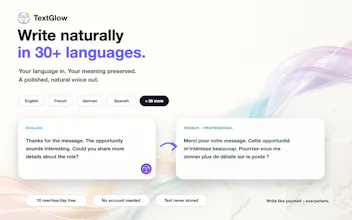
Your writing shouldn't need a trip to ChatGPT. TextGlow puts AI inside the text fields you already use like Gmail, LinkedIn, Slack, job applications, and more. Click the ✨, choose from 10 tones, and get polished text in place in seconds. No prompts, copy-paste, or broken focus. Write naturally in 30+ languages with privacy-first processing. Free for 10 rewrites a day, with no signup required.
No reviews yetBe the first to leave a review for Textglow
Maker
📌
Hey Product Hunt! 👋
I built TextGlow because I was wasting an embarrassing amount of time copy-pasting text into ChatGPT just to fix the tone of my emails.
The workflow was always the same: type something in Gmail or LinkedIn → realize it sounds too aggressive/too casual/too awkward → open ChatGPT → write a prompt explaining what I want → copy the result → paste it back → edit it again because it lost my original meaning. 5-6 steps for something that should take 2 seconds.
So I built a Chrome extension that puts a small ✨ icon inside every text field. Click it, pick a tone (Professional, Friendly, Confident, etc.), and your text is rewritten in-place. That's it. No tab-switching, no prompt engineering, no copy-paste.
What I'm most proud of:
It works literally everywhere — Gmail, LinkedIn, Slack, Twitter, Discord, Notion, even dating apps 😅
It's built for non-native English speakers. I know how stressful it is to wonder if your email sounds "off" in a language that isn't your first. TextGlow handles tone and cultural nuance, not just grammar.
It's free. 10 polishes a day, no signup, no credit card. I wanted zero barriers.
I'm a solo dev and I'm paying for every API call out of pocket, so if this thing takes off today I might need to have a chat with my bank account 😄
Would love to hear:
Is this solving a real problem for you?
What tones would you add?
Where would you want this to work that it doesn't yet?
Thank you for checking it out — every upvote and every piece of feedback means the world. 🙏
Report
the in-line approach is smart, especially for job apps where tone really matters. one thing that would make it even better: a quick keyboard shortcut to trigger the menu so i don't have to hunt for the sparkle icon with my cursor every time.
Report
The no signup free tier is a nice touch for trying it out. One thing I'd love to see is a keyboard shortcut to open the tone menu so I never have to leave the keyboard, since the whole point is staying in flow. Maybe something like Cmd+G or a customizable combo.
Report
The inline sparkle button in the text field itself is a really smart choice. Skip the popups and sidebars, keep people in the actual writing flow. That kind of restraint takes more thought than it looks like.
the in-line approach is smart, especially for job apps where tone really matters. one thing that would make it even better: a quick keyboard shortcut to trigger the menu so i don't have to hunt for the sparkle icon with my cursor every time.
The no signup free tier is a nice touch for trying it out. One thing I'd love to see is a keyboard shortcut to open the tone menu so I never have to leave the keyboard, since the whole point is staying in flow. Maybe something like Cmd+G or a customizable combo.
The inline sparkle button in the text field itself is a really smart choice. Skip the popups and sidebars, keep people in the actual writing flow. That kind of restraint takes more thought than it looks like.