Launching today

Tekyous
Build your tech stack visually, with real-time hints
11 followers
Build your tech stack visually, with real-time hints
11 followers
Tekyous is an interactive tech stack builder and tools directory for developers and founders. Start from one of 150+ curated stacks, a two-question recommendation or a blank canvas, then draw your stack as a diagram with frames, connectors, notes and your own tools. Live hints show which tools you might be missing or where they overlap, based on nearly 300 curated developer tools. Free to use.


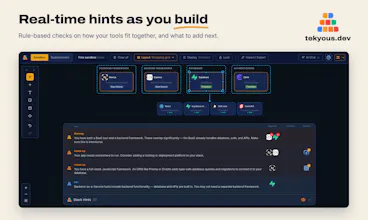


Hey Product Hunt 👋
I'm Przemek (Schamack), maker of Tekyous.
Picking a tech stack has always been overwhelming, and the rise of AI hasn't made it any easier. Before, it was a new framework every week. Now it's a new model, a new coding harness, a new agentic development environment. Every day.
Staying up to date is almost impossible. We could say it's not necessary, and that we should just stick to what we know. And although that's mostly true, we should at least stay aware of how different tools work together.
Tekyous is my attempt to make that easier. It brings three things into one place:
→ A curated directory of nearly 300 developer tools, each scored, with how it relates to other tools, and growing every week
→ 150+ curated stacks, split into core tools, options for every layer, and add-ons
→ An interactive canvas where you build your stack and get real-time hints: what's missing, what overlaps, what pairs well
The hints don't come from an LLM. They're rules built on hand-curated tool relationships, so they're consistent and you can see why each one appears.
The canvas also just became a proper diagramming tool: frames, labelled connectors, notes, your own custom tools, several card styles, and export to a file anyone can import.
It's still in beta. Coming next: user accounts, AI features inside the app, and an MCP server so your own AI assistant can generate diagrams with Tekyous. The core (catalogue, stacks and the canvas) is free and stays free, no account needed.
I'd love your feedback:
- Which tool or stack is missing?
- Would you put a diagram like this in a README or a design doc?
Thanks for checking it out 🙏