Syncrix synchronises files between your own cloud storage accounts — Google Drive, Google Photos, Dropbox, OneDrive, Box, S3 and more. Copy, mirror or two-way sync folders on a schedule; files stream directly between providers and are never stored on our servers.
No reviews yetBe the first to leave a review for Syncrix
Maker
📌
Hi Product Hunt 👋
I built Syncrix after Google closed library-wide Photos API access in 2025. My own
backup script died overnight, and every tool I tried told me the same thing: the API
is gone. Meanwhile my Google storage was full and 15 years of family photos lived in
exactly one account.
Syncrix moves data between clouds, cloud-to-cloud, without your computer being
involved:
• **Google Photos, the two ways that still work** — the official Photos Picker for
albums and selected photos, and Google Takeout import: send the export to your Drive,
we unpack it, drop the JSON sidecar clutter, keep album folders, and write the media
to whichever cloud you choose.
• **13+ providers** — Drive, Photos, Dropbox (incl. Business), OneDrive (incl.
Business), Box, pCloud, Amazon S3, Cloudflare R2, Backblaze B2, Google Shared Drives.
• **Scheduled and incremental** — the first run copies everything, later runs compare
size and modified time and skip what hasn't changed. Runs server-side, so a nightly
backup happens with every device switched off.
• **Mirror and two-way**, with a **dry-run preview**: mirror mode can delete at the
destination, so you can see the exact list of copies, updates and deletions before
anything moves. I wanted that for myself before I trusted it with my own data.
• **Nothing stored on our servers** — files stream from source to destination; we keep
names, sizes and timestamps so the next incremental run knows what to skip. Cloud
tokens are encrypted with AES-256-GCM. Google access uses the drive.file scope, so we
can only see what you pick.
• **Unified explorer** — two clouds side by side, drag files across, no rule needed.
• **Alerts** — failed jobs retry automatically, then email you (Discord/Telegram
webhooks too, because I never read email).
Honest about the limits: no tool can read your whole Photos library through the API any
more, ours included. Picker + Takeout is the honest path, and Takeout is the one that
gets everything.
Free plan is 2 GB of transfer a month, 2 clouds, 1 rule — enough to move an album and
see the whole flow. Pro is $9/month (100 GB), Business $29/month (500 GB).
I'm here all day. Tell me which provider or edge case you need and I'll answer
straight — including when the answer is "we can't do that yet".
Report
Maker
For context, Syncrix currently supports Drive, Google Photos, Dropbox, OneDrive, Box, pCloud, S3, R2, B2 and more.
The important part for me isn't just the number of providers.
It's making the workflow reliable enough that you can configure it once and stop thinking about it.
If there's a provider or backup workflow you're currently solving with a script, I'd genuinely like to hear about it. It might become the next thing I build.


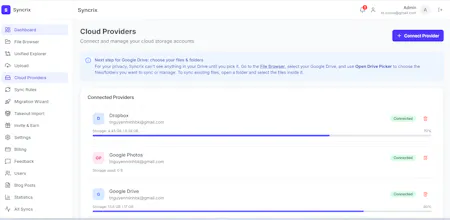


For context, Syncrix currently supports Drive, Google Photos, Dropbox, OneDrive, Box, pCloud, S3, R2, B2 and more.
The important part for me isn't just the number of providers.
It's making the workflow reliable enough that you can configure it once and stop thinking about it.
If there's a provider or backup workflow you're currently solving with a script, I'd genuinely like to hear about it. It might become the next thing I build.