
Sushi
Your Raw Data Served Perfectly
9 followers
Your Raw Data Served Perfectly
9 followers
Sushi helps you understand a data file without wrestling with formulas. Upload CSV, TSV, XLSX, JSON, Parquet, or SQLite to explore data quality, patterns, charts, and clear findings.




Free
Launch Team

Customer.ioAutomate Messaging Everywhere — Startups Get 12 Months Free
Promoted
Hi Product Hunt! I built Sushi for the moment when you receive a spreadsheet or exported data file and need to quickly understand what is actually inside it.
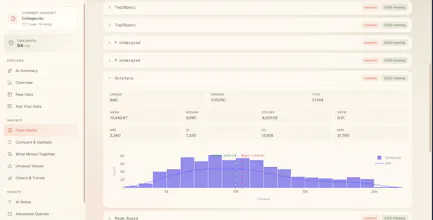
Upload a file and Sushi gives you data-quality checks, field health, patterns, charts, and a plain-English report. You can explore the sample report without an account; create one when you’re ready to analyze your own file.
I’d love feedback on few things:
What should the first report answer for you?
What would make you trust a report enough to share it with your team?
Anything breaking or feels ambiguous?
Try it here: https://trysushi.xyz
These requests are helping shape the next iteration: clearer file-version comparison, a faster column dictionary, and a presentation-ready sharing view.
If you want to test Sushi with your own file, create an account and upload a CSV, XLSX, JSON, Parquet, TSV, or SQLite file: https://trysushi.xyz
A diff view between two file versions would be huge for me. I often re-export data with small tweaks and it would save so much time if Sushi could highlight exactly what changed in structure, types, or value distributions between uploads instead of forcing me to compare results manually across sessions.
@medineasl16675 This is exactly the workflow I want Sushi to handle better. There is already a Compare flow for two files that highlights schema, row-count, and column differences, but you’re right that type and value-distribution changes should be much more explicit.
If you’re open to it, I’d love for you to try it with two exports and tell me which differences matter most in your workflow.
One thing that would save me a lot of time is letting me compare two files side by side, like spotting schema drift or row count differences between yesterday's export and today's. The single-file view looks great, but most of my headaches come from figuring out what changed.
@havvamehel Hi Thank You so much for the feedback
Sushi does have this feature if you create an account, you can upload two files and compare them
check it out
would love to see a way to share findings with non-technical teammates, like an export to a clean PDF report or a shareable link that just shows the charts without the raw data. would make it way easier to loop people in
@remg3bj Completely agree. Sushi already supports PDF export, but a clean presentation-only share view focused on the findings and charts, without raw rows is a better sharing workflow for non-technical teammates. That is a very useful distinction.
Would you prefer a shareable web link, a polished PDF, or both?
The drag-and-drop file detection that quietly figures out whether you dropped a Parquet file or a SQLite db without making you pick is such a nice touch, really shows the team thought about the small frustrations first.
@kemalsekretjbz Thank you, Kemal, that means a lot. We wanted the upload step to feel like the least complicated part of the workflow, especially when you are dealing with exports in different formats.
The goal is to let you drop in the file you already have and get to understanding the data, without first having to think about import settings.
Really nice work on Sushi. Hope the launch goes brilliantly! 🎉
@zvonimir_sabljic1 Thank You so much for your support. Checked out Pazi and used it to validate my product ideas its really helpful. All the best with Pazi