
SurveyOL
Create smarter surveys with AI integration,real-time insight
9 followers
Create smarter surveys with AI integration,real-time insight
9 followers
SurveyOL ✨ Build professional surveys in minutes with AI assistance 🔗 Sync Data directly to HubSpot CRM and Google Analytics 📊 Monitor real-time results in the dashboard 💡 Mobile-ready, GDPR-compliant, and branding customizable
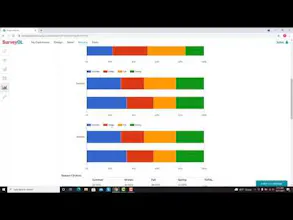


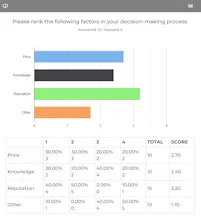





@niudao_xiaoshi I'm really impressed with the summary report feature. It saves time and adds real value, especially when sharing insights with others. Nicely done.
@niudao_xiaoshi @joe2025
Hi Joe!
SurveyOL has a free tier available — you can sign up and test all the core features right away.
@niudao_xiaoshi
Hi, It Looks good! Would this work well for internal employee feedback or HR use cases?
@niudao_xiaoshi @blue_baggio
SurveyOL is a great fit for internal surveys — whether it's onboarding feedback, employee engagement, training evaluations, or exit interviews.
What's especially helpful is that all responses can be synced directly into your HubSpot CRM or exported to your HR system, so your team doesn't have to manage data manually.
Plus, with real-time analytics and logic-based questions, you can run meaningful, customized surveys across departments in minutes.
I wish you could see my comment: can I try out your free plan without needing an invite or access code?
The reports look great — can they be exported to PDF or PowerPoint? If yes, how easy?
@joe2025
Yes — absolutely!
SurveyOL allows you to export reports to PDF with one click. The exported reports include charts, response breakdowns, and key metrics — all styled professionally for sharing or presenting.
The raw response data can also be exported in multiple formats — including Excel (XLSX), CSV, PowerPoint (PPTX) ,and PDF — so you can analyze or archive it however you like.
So in short: yes, and it’s super easy. 😊
Here’s a link that might help you even more:
https://www.surveyol.com/help/export-survey-responses
@joe2025
@joe2025 Yes! That's very important!thanks for your ask Joe
@joe2025
You can easily customize your survey title or page title.
Change survey title
On the Dashboard page, click on the Edit link for an existing survey.
Click on the survey title.
Enter or change the survey title.
Select Left Aligned or Center Aligned.
Click on the Save button.
Add logo
More information:https://www.surveyol.com/help/title-and-logo
This looks interesting! Does SurveyOL help generate survey questions automatically with AI, or do we have to write them manually?
@blue_baggio
Great question — Yes, SurveyOL uses AI to help you generate survey questions based on your goal or topic.
Just describe what you're trying to measure (like “customer satisfaction” or “product feedback”), and we’ll suggest a set of relevant, editable questions instantly.
It's a huge time-saver, especially for teams that run frequent surveys!
@surveyol_ai
That's great! AI has truly become one of the most powerful tools of this generation
Thanks for your response
@blue_baggio
@blue_baggio @surveyol_ai
Our company conducts a large number of market research surveys, and having AI assistance would be a game changer, I'm glad to see that, cool!
It could really streamline the process and help us get faster, deeper insights from the data.
Just wondering — can I try out your free plan without needing an invite or access code?
I mean I can try the full-featured product.