
SuperTerminal
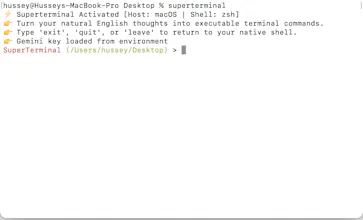
SuperTerminal is a natural language terminal.
8 followers
SuperTerminal is a natural language terminal.
8 followers
SuperTerminal does not need the perfect command but rather you just say whatever you want to do naturally, and it'll execute the perfect command for it. You can write an imperfect natural command, with a typo, or describe the task vaguely, and it will still understand what you meant and produce a usable command. For sensitive commands, it does not auto-execute. It places the generated command on the next terminal line, where you can inspect it, edit it naturally, and press Enter yourself.

Free
Launch Team

Render: Get up to $100K in startup creditsCloud infrastructure for founders who want to move fast and NOT break things
Promoted
The inspect-before-run approach is genuinely thoughtful. One thing that would make this way more useful for me: let me save my own corrections as reusable rules, so when I say something a certain way repeatedly it learns my phrasing. Right now I'd imagine fixing the same tiny phrasing mismatch over and over.
@kacalisat53860 Thanks, Sati. Definitely something I'd try to incorporate into it, would make it more personalized.
@kacalisat53860 Hey Sati, I added the personalization you suggested. Would love if you can use and give me feedback on the feature. You can update it simply with ```pip install --upgrade git+https://github.com/Hassaan9651/Super_Terminal.git```
love that it doesn't auto-run sensitive commands, just drops the line for you to inspect. that small choice makes it feel safe enough to actually use day to day.
@hediyedilli Yeah, I made this choice as the primary user. I don't like losing control, like how other agents would just keep doing stuff, and a lot of it you just can't keep up with.
Honestly the natural language input feels magical. Threw a messy description at it and it nailed the command on the first try, plus having it wait for my Enter on risky stuff is a smart touch.
the fact that it just places the generated command on the next line for you to inspect and edit before running is honestly the smartest part. so many tools like this just auto-execute everything and you end up scared to even try them. the "show me first" approach shows real respect for the user.
Typed something like "find big files eating my disk" and it actually spit out a usable du command, which surprised me. Love that it waits for me to hit enter on anything risky instead of just blasting it through.
The "place the command on the next line for you to inspect" choice is such a respectful design move. Keeps the speed of natural language without ever yanking control away from the user.