Sublime's suite of tools are .... sublime :P ..
But actually, I really enjoy the simplicity of merge and usability. I don't always need to git from a UI, but on occasion it's nice to have a visual helper to solve conflicts or cherry picks.
One of the standouts is the 'show underlying git commands' feature that I use to help me learn crazy git commands.
No more copying over entire folders, recloning, new branch, copy back over and resolve from there.
Of all of the Git clients I've used, this is the only client that keeps the closest parity with the Git tool while keeping a clean and functional UI. I recommend this to all developers new and experienced, because you get to see what flags you're running for each command
Report
2 views
Just wanted to give it a try. Sadly doesn't adapt to any UI scaling on Linux and therefor I can't read any text on my Laptop or Screen... Tried to set some values I know from Sublimetext, but sadly this software doesn't seem far enough yet.
Would love to use it though.
@kwiesmuller If you open `~/.config/sublime-merge/Packages/User/Preferences.sublime-settings` and enter `"dpi_scale": 2.0` and restart, that will override what it detects from GTK. On all platforms you can use the `ui_scale` setting to bump up the size of everything.
Report
@wbond That worked like a charm! Thanks a lot.
Is Sublime Merge OpenSource/on GitHub?
@kwiesmuller No, Sublime Merge is a proprietary product and source code is not available. It was built on top of the foundations of Sublime Text, our other product, which is also closed source.
Report
Hi @wbond! This doesn't support emojis if I compare it to other tools like Gitkraken. Users of Gitmoji (https://gitmoji.carloscuesta.me) will not find this useful.
@preetesh_jain Right now we are working on ironing out bugs and getting missing features in place so as many users as possible can use Merge in their day-to-day git workflow. If you drop by https://forum.sublimetext.com/c/..., that is the best place to leave feature requests.
Report
As it is very young (released 4 days ago) it doesn't have as much features as Gitkraken for example... I love Sublime Text for it's speed! And as you can imagine they share the same engine! So it's super fast!
I think Gitkraken takes about 30 seconds for me to open, and this little boy just opens instantly!!! I was so amazed!
The design is pretty good too. Similar to Sublime Text's default theme. But a custom theme support would be cool... Also the dark theme is license-only which sucks.
Pros:
Very fast, not Electron based, clean
Cons:
Lack of features
Report
Are custom themes / plugins planned? Would be amazing if you could extend the functionality!
@skayo_ The licensed version does allow custom themes, and we've augmented the theme engine from Sublime Text with additional features including variables and the ability to extend another theme. This makes it really easy to tweak colors if you want to customize the interface. We'll be working on getting documentation expanded in coming weeks to include information about how to do this. Until then, if you are enterprising you can copy the "Theme - Merge.sublime-package" file from the Sublime Merge folder and extract it as a zip to see the Merge.sublime-theme and Merge Dark.sublime-theme files. You can use those as a basis to make you own theme.
Report
Fantastic! Been looking for a new GUI for my Git workflow. Love (and use) Sublime Text for years.
Report
+1 for not using Electron.... Will give it a try for sure...

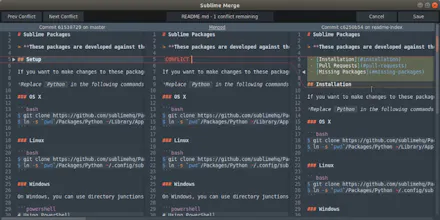


As it is very young (released 4 days ago) it doesn't have as much features as Gitkraken for example... I love Sublime Text for it's speed! And as you can imagine they share the same engine! So it's super fast!
I think Gitkraken takes about 30 seconds for me to open, and this little boy just opens instantly!!! I was so amazed!
The design is pretty good too. Similar to Sublime Text's default theme. But a custom theme support would be cool... Also the dark theme is license-only which sucks.
Pros:Very fast, not Electron based, clean
Cons:Lack of features