Launching today

StorageRadar
See what clearing Xcode, Docker and caches will cost you
2 followers
See what clearing Xcode, Docker and caches will cost you
2 followers
StorageRadar maps what takes space on your Mac and tells you what each cleanup costs: "Rebuilt on next build", "Re-downloaded when needed", or data you lose. Review the paths, run a dry run, move files to the Trash. Free to scan.





Free Options
Launch Team / Built With


Framer AI AgentsDesign and publish professional sites with AI
Promoted
Hi Product Hunt! I'm Vladimir, a backend developer, and I build StorageRadar by myself.
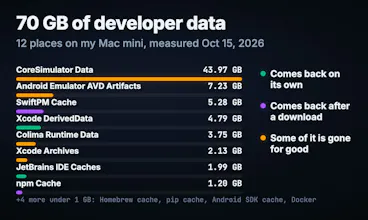
On October 15 my Mac mini had over 70 GB of developer data in 12 places. Simulators took 44 GB of it: 46 iPhone and iPad devices I had forgotten about. Each of those places costs something different when you delete it:
• DerivedData: Xcode rebuilds it, and your first build after that runs slower.
• Simulators: Xcode re-creates them empty. The apps and data on them are gone.
• Xcode Archives: these are builds you shipped. Delete them and you lose the dSYMs that symbolicate old crash reports.
StorageRadar shows that line on every developer cleanup before you run it. You check the exact paths, run a dry run, and the app moves the files to the Trash. Dev Cleanup and Duplicate Review give you 10 seconds to undo. The app deletes nothing on its own and refuses cleanup on roots like ~/Library.
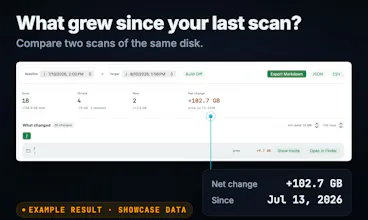
It also maps the whole disk, finds app leftovers and duplicates, and compares snapshots between scans, so you can see what grew since last week (Developer tier). Scans run on your Mac, with no account. Scanning and review are free. Cleanup is a one-time unlock: Core $9.99, Developer $19.99, no subscription.
For the next 48 hours, code PRODUCTHUNT takes the Developer unlock to $9.99 on storageradar.app.
I turned ten folders from my Mac into a quiz. You guess what deleting each one costs, and the answers are the lines StorageRadar shows: storageradar.app/safe-to-delete/?ref=producthunt
I'm here all day. Paste the path of a folder on your Mac that you can't explain, and I'll tell you what deleting it costs.