Powerful Google Analytics and Search Console companion.
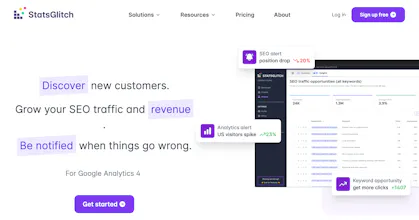
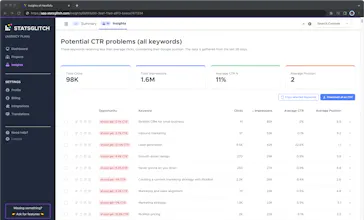
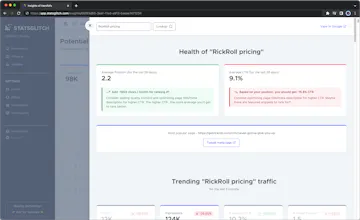
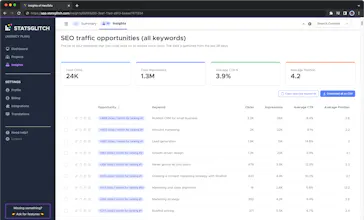
Automatic monitoring for your website traffic changes. Track goal conversions, SEO searches, pageviews. Smart SEO insights.
Hey PH fans,
*** PH launch special deal! Apply "PH2019" at the signup page and get the 50% lifetime discount 🎆 ***
I'm a software engineer, a dreamer who loves building things, and a geek who's crazy about problem-solving 🤓
Today I want to present an essential tool for everybody who uses Google Analytics.
StatsGlitch removes the pain from daily checking of your Google Analytics stats. Less time wasted = more exciting things to do.
🧔 For Solo Founders/Blog Owners - use a free plan and available presets for setting up the most common traffic alerts. We all have side projects which we care about, but can't dedicate enough time, especially for investigating traffic glitches. Setup once and you won't miss your next week-long outage (true story), or a mention on social media which drove you a ton of lost traffic.
👩💻 For Startups - I'm sure you already have a vision of which metrics matter to you. Setup a custom or real-time alerts to track your referrals, goal completion, or bounce rate. Keep an eye on basically everything you can track via Google Analytics. Automatically forward alerts to responsible people in your team or even setup a webhook. Merely being aware of your traffic already places you higher than your competitors.
👨💼 For Agencies - the pain of continually maintaining clients projects is overwhelming enough, not to mention monitoring their Google Analytics. Add the most important alerts to your clients once, and forget that pain. You can be sure, that StatsGlitch will notify you if something "weird" will happen. Maintain all clients alerts under one roof and finally take full control.
🤖For Everybody - if daily or real-time alerts are not a massive thing for you, StatsGlitch has one more thing to offer. You can setup a weekly overview report and always stay informed about your most important metrics in a non-intrusive way. Receive a traffic/goals report once a week, nothing more, nothing less.
Now, I would love to hear your thoughts, ideas, or proposals. Help StatsGlitch to become your swiss-army-knife for Google Analytics.
P.S. Don't forget the PH exclusive deal; it won't last long!
Report
Usually I setup Google Analytics and try to forget it.
Google Analytics has it's own alerts system - wow how terrible it is and hard to use/configure.
This gives me freedom to quickly setup it and forget. And I like your templates.
Good job man!
Pros:
Weekly sites statistics e-mail.
Alerts notifications.
Easy to use Dashboard - like few minutes and you all setup and running.
Cons:
None so far.
Report
I used statsglitch.com for more than a year, and it really worked well.
My personal use-case:
- Created multiple sites (all sites were similar)
- Setup Google Analytics
- Setup statsglitch.com
- Work on different type of link building strategies
With statsglitch email notifications I knew when something is working and when it doesn’t. So I easily validated which strategies pushing traffic well and where I need to focus my attention. Great job Arminas!
Pros:
Easily monitor organic traffic spikes (this is huge)
Setup and forget
Weekly reports
Cons:
Would love to see easier slack and ifttt integration
Report
StatsGlitch is the Google Analytics hero that cover the pain points for users.
Real-time alert is the killer feature that I can monitor all my sites effortlessly.
Slack notfication, email notification, webhook notification are the most powerful notification integration I've ever see. So impressive!
Optimize Google Analytics then rule it to StatsGlitch and passively recieved notifications from it.
Pros:
Great UI/UX, easy to use, powerful notification and awesome suport


Clearbit
Usually I setup Google Analytics and try to forget it. Google Analytics has it's own alerts system - wow how terrible it is and hard to use/configure. This gives me freedom to quickly setup it and forget. And I like your templates. Good job man!
Pros:Weekly sites statistics e-mail. Alerts notifications. Easy to use Dashboard - like few minutes and you all setup and running.
Cons:None so far.
I used statsglitch.com for more than a year, and it really worked well. My personal use-case: - Created multiple sites (all sites were similar) - Setup Google Analytics - Setup statsglitch.com - Work on different type of link building strategies With statsglitch email notifications I knew when something is working and when it doesn’t. So I easily validated which strategies pushing traffic well and where I need to focus my attention. Great job Arminas!
Pros:Easily monitor organic traffic spikes (this is huge) Setup and forget Weekly reports
Cons:Would love to see easier slack and ifttt integration
StatsGlitch is the Google Analytics hero that cover the pain points for users. Real-time alert is the killer feature that I can monitor all my sites effortlessly. Slack notfication, email notification, webhook notification are the most powerful notification integration I've ever see. So impressive! Optimize Google Analytics then rule it to StatsGlitch and passively recieved notifications from it.
Pros:Great UI/UX, easy to use, powerful notification and awesome suport
Cons:None so far