Launching today

SpeedGlance
GPS speed and road limits without starting navigation
2 followers
GPS speed and road limits without starting navigation
2 followers
SpeedGlance shows GPS speed and available road limits without starting navigation. Use a digital or analog speedometer, or keep your speed above your map with Pro Mini Overlay. Correct a road limit and SpeedGlance remembers it on your phone for that stretch and direction. Available on Google Play in the US, Canada, and Australia.

Free Options
Launch tags:Android
Launch Team

CloudflareStill paying to deploy your apps? Try Cloudflare Workers for free
Promoted
I know my city and my usual routes well. When I’m driving somewhere familiar, I rarely need turn-by-turn directions. But I still want to see how fast I’m going and what the speed limit is on that street. In the map apps I used, that usually meant starting navigation. So I built SpeedGlance for myself and recently released it on Google Play.
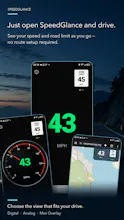
SpeedGlance shows your current GPS speed and automatically looks up the speed limit when road data is available. You can choose a full-screen digital or analog speedometer. If you want to keep your map open, Mini Overlay shows your speed in a small window over it or another app.
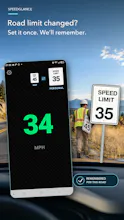
On smaller streets, speed limit data is sometimes missing or out of date. When that happens, you can set a limit or correct the one the app shows. SpeedGlance saves your choice on your phone. When you drive that same stretch in the same direction again and the app recognizes it, it shows your saved limit. Follow posted signs if they differ from what the app shows.
After a drive, you can look back at your route and see how far you drove over a period you choose.
SpeedGlance Pro is a paid subscription. If Google Play shows a 7-day free trial for your account, you can start the subscription and try the Pro features, including Mini Overlay and trip history. If you decide not to continue, cancel in Google Play before the trial ends to avoid being charged.
The app is available in the US, Canada, and Australia for now. If you’re in one of those countries and this sounds like the kind of driving you do, try SpeedGlance on a familiar route. I’d appreciate your feedback. What was useful, what got in the way, and would you keep the floating window over your map or prefer the full-screen view?
https://play.google.com/store/apps/details?id=com.speedglance.app