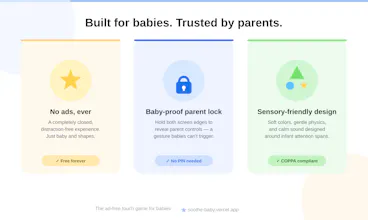
Soothe Baby is a gentle touch game for the littlest hands — babies 3 months to 2 years. There's no score, no timer, no game over. Nothing to win or lose. Every tap brings a colorful shape to life with a soft animal sound, so even the youngest baby can play. It's made for the hard moments: when your hands are full, when your baby won't stop crying, when you just need a moment to breathe. No ads. No sign-up. No data collected. Always free, always here for you.
No reviews yetBe the first to leave a review for Soothe Baby
Hunter
📌
Hi Product Hunt! 👋
I'm the maker of Soothe Baby, and I want to share the very personal reason I built it.
I have a 1-year-8-month-old daughter. During the day I work as an engineer at a factory, so my wife takes care of her alone. Our daughter is truly adorable — but like every baby, she has moments where nothing settles her. Not toys, not picture books, sometimes not even YouTube.
Too often, those moments arrive exactly when my wife's hands are already full. She told me she sometimes gets overwhelmed, and then feels guilty for it. No parent should have to carry that guilt alone.
So I built Soothe Baby for both of them — a small, calm space that might give my wife a little breathing room, and give our daughter a happy, gentle moment.
It's simple on purpose: tap the screen, and a colorful shape comes to life with a soft animal sound. No score, no timer, no game over — so even the littlest baby can play freely, for as long as they like. No ads, no sign-up, no data collected. Free, always.
If it helps even one other family the way I hope it helps mine, that's everything to me.
I'd love to hear from other parents: what do you reach for when your little one just won't settle? 🙏
Report
Genuinely curious — does the app keep playing sounds and animations continuously until closed, or do you have to tap to reactivate it each time? Trying to picture using it one-handed while holding a fussy baby.
Great question, thank you for imagining that real scenario so carefully — it really helps me think about this the right way!
To answer directly: it’s tap-reactive, not a continuous loop. Each tap makes an animal/shape burst and gently fade out over a few seconds, and if you stop tapping, it just settles into a quiet, still background — no sound, no motion running on its own. So there’s no need to “restart” it; your device won’t fall asleep either, since the app keeps the screen awake automatically while you’re playing.
One small thing worth knowing: for privacy reasons the app doesn’t save any settings at all (no cookies, no local storage), so sound starts off by default each time you open it. A quick long-press unlocks it for that session — after that you’re free to just tap away one-handed.
It’s a simple web app too, so there’s nothing to install — just open the link and hand the phone over. I hope it can be even a small help on a rough day with a fussy little one. Thanks again for the thoughtful question! 🙏
Report
A small sleep timer with a slowly dimming screen would be amazing, since this seems perfect for calming fussy babies before naps but right now you have to manually turn it off when they finally doze off.
Thank you so much for this idea 🙏 — it genuinely hadn’t occurred to me, and it was such a pleasant surprise 😊 A sleep timer with a slowly dimming screen fits the concept of Soothe Baby perfectly 🌙 We’re starting on it right away, so hopefully we’ll have it ready to show you in the next update ✨ Really appreciate you taking the time to share this with us!
Genuinely curious — does the app keep playing sounds and animations continuously until closed, or do you have to tap to reactivate it each time? Trying to picture using it one-handed while holding a fussy baby.
@melisafk81
Great question, thank you for imagining that real scenario so carefully — it really helps me think about this the right way!
To answer directly: it’s tap-reactive, not a continuous loop. Each tap makes an animal/shape burst and gently fade out over a few seconds, and if you stop tapping, it just settles into a quiet, still background — no sound, no motion running on its own. So there’s no need to “restart” it; your device won’t fall asleep either, since the app keeps the screen awake automatically while you’re playing.
One small thing worth knowing: for privacy reasons the app doesn’t save any settings at all (no cookies, no local storage), so sound starts off by default each time you open it. A quick long-press unlocks it for that session — after that you’re free to just tap away one-handed.
It’s a simple web app too, so there’s nothing to install — just open the link and hand the phone over. I hope it can be even a small help on a rough day with a fussy little one. Thanks again for the thoughtful question! 🙏
A small sleep timer with a slowly dimming screen would be amazing, since this seems perfect for calming fussy babies before naps but right now you have to manually turn it off when they finally doze off.
@egemeniler26204
Thank you so much for this idea 🙏 — it genuinely hadn’t occurred to me, and it was such a pleasant surprise 😊 A sleep timer with a slowly dimming screen fits the concept of Soothe Baby perfectly 🌙 We’re starting on it right away, so hopefully we’ll have it ready to show you in the next update ✨ Really appreciate you taking the time to share this with us!