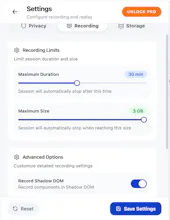
Sonix Recorder is a privacy-first Chrome extension for recording browser sessions. Record, replay, and edit browser workflows directly in Chrome. Keep recordings stored locally by default, highlight user interactions with auto-zoom, trim unwanted sections, and blur sensitive information before exporting.
Battery AutopilotPut your MacBook battery on AI autopilot
Promoted
Maker
📌
👋 Hello Product Hunt!
I built Sonix Recorder because I wanted a simple way to record browser sessions for bug reports, demos, and documentation without relying on cloud-based recording services.
Sonix is a privacy-first Chrome extension that lets you record, replay, and edit browser workflows while keeping recordings stored locally by default.
Key features:
• Record browser tabs and sessions
• Replay and edit recordings
• Auto-zoom user interactions
• Trim unwanted sections
• Blur sensitive information
• Local-first storage
It's designed for developers, QA teams, support teams, and anyone who needs an easy way to capture browser-based workflows.
I'd love to hear your feedback, feature suggestions, or how you're currently handling browser session recording today.
Thanks for checking out Sonix!
Great tool for recording and replaying browser sessions. I especially like the privacy-first approach with local storage by default. Simple, fast, and very useful for debugging and QA workflows.
What needs improvement
The product is already very useful. I'd love to see more export options, deeper analytics, and additional collaboration features for teams in future updates.
I chose Sonix because of its privacy-first approach and local storage. It provides the features I need for session recording without relying heavily on cloud-based services.
A privacy-first way to record, replay, and edit browser sessions.
vs Alternatives
I considered several screen recording and session recording tools, but Sonix stood out for its local-first approach, privacy focus, and browser-native experience.