
SnapZoom - AI Auto-Zoom on Click
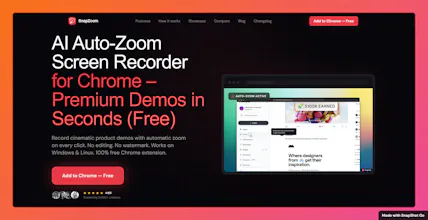
AI auto-zoom screen recorder for Chrome. No editing.
21 followers
AI auto-zoom screen recorder for Chrome. No editing.
21 followers
Free Chrome screen recorder with AI cinematic auto-zoom on every click. 12x faster exports, pro webcam overlays, local privacy. Best Loom & Screencastify alternative for product demos & tutorials.


Hey Nagaraj
This is genuinely amazing. Since this is an extension I suppose it's quite lightweight(isn't it?).
One question though how do you handle the ai costs when you don't charge users and is this open source?
@jay_gangwar Thanks man! Yeah i handle it. I wont charge any ai costs.
👋 Hey Product Hunt!
I'm Nagaraj, the solo developer behind SnapZoom.
I built it because I was tired of spending 90 minutes manually editing zoom keyframes for a 4-minute screen recording. I wanted something that could automatically create smooth zoom effects without the usual editing workflow.
🎯 AI Auto-Zoom
✔️ Detects clicks automatically
✔️ Applies smooth cinematic zoom effects in real time
✔️ No manual keyframing required
⚡ 12x Faster Export Engine
✔️ Export 4K videos in seconds
✔️ No re-exports
✔️ No bitrate tweaking
🎥 Pro Webcam Overlay
✔️ Circular facecam overlay
✔️ 4 placement options (Top Left, Top Right, Bottom Left, Bottom Right)
✔️ Hybrid-Sync technology keeps audio and video perfectly aligned
🎨 37+ Studio Backgrounds
✔️ Professional gradients and studio-style scenes
✔️ Instantly improve the look of recordings
✂️ Built-in Editing
✔️ Trim recordings
✔️ Crop videos
✔️ Export without opening another editor
🔍 Custom Zoom Controls
✔️ Zoom intensity from 1x to 4x
✔️ Disable Auto-Zoom anytime for full manual control
📱 1-Click Vertical Export
✔️ Export directly to 9:16 format
✔️ Perfect for Shorts, Reels, and TikTok
🔒 Privacy First
✔️ No account required
✔️ No watermark
✔️ No cloud uploads
✔️ Everything runs locally on your machine
💻 Cross-Platform
✔️ Works on Windows and Linux
✔️ Not limited to Mac users
💰 Pricing
🆓 Free tier
✔️ Fully functional
✔️ No watermark
✔️ No signup required
🚀 Lifetime Access
✔️ $9.99 today
✔️ Started at $4.99
✔️ Will increase to $29 in the next version
✔️ Only 5 spots remaining at the current price
🔗 Links
👉 Install Free: Chrome Web Store
🌐 Landing Page & Demo: https://snapzoom.pro
I'd love honest feedback:
❓ What's missing?
❓ What's confusing?
❓ What feature would make you use SnapZoom every day?
I'll be here all day answering questions and collecting feedback. Thanks for checking it out! ❤️