Launching today

SmoothCut
Screen recordings that look edited, without the editing
14 followers
Screen recordings that look edited, without the editing
14 followers
SmoothCut records your screen and camera, then adds zooms that follow your cursor, a smooth cursor, camera layouts, clean audio and captions for you. It runs on Mac and Windows, works offline, and you pay once. Free to try, export included.




Hey Product Hunt,
I'm CJ, the maker of SmoothCut.
Every product demo I recorded took five minutes to capture and an afternoon to make presentable: keyframing zooms by hand, steadying the cursor, cleaning up the audio, typing captions.
The tools that did that for you were Mac-only, sold by the month, or uploaded everything to the cloud.
SmoothCut does that work for you:
• Zooms that follow your cursor, added as you record, and adjustable on the timeline
• A smooth cursor you can resize or restyle after recording
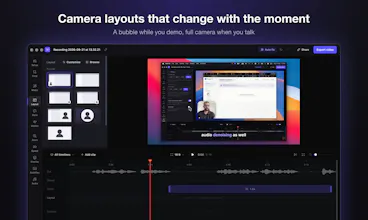
• Camera layouts: a bubble while you demo, full camera when you talk
• Noise removal, music that ducks under your voice, and captions made on your own computer
• Export MP4 or GIF up to 4K at 60 fps, in 16:9, 9:16 or 1:1
It runs on macOS and Windows, works offline, and nothing is uploaded unless you share a link.
Pricing is simple: it's free to use, export included (720p with a small mark). A one-time licence removes the mark and adds 4K, 60 fps and share links: $79 for one computer, $169 for five. No subscription.
I'd love your honest feedback, especially what's missing for the videos you make.
I'll be here all day answering every comment. 🙏
Does it keep the raw full-res recording too, so I can redo the zooms later or cut it in Resolve?