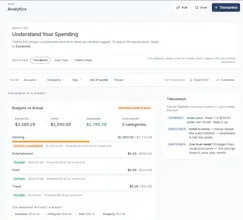
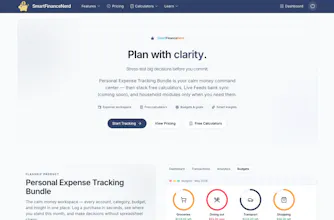
SmartFinanceNerd is a modern personal finance platform built for the way we actually manage money today. Moving beyond rigid, old-school spreadsheets, it offers a fast, native-feeling architecture designed for individuals, duos, and modern households. Take control of your financial stack with flexible workspaces, expense tracking, and privacy-first database security - all wrapped in a clean, high-performance UI that makes tracking your net worth seamless.
No reviews yetBe the first to leave a review for SmartFinanceNerd
Maker
📌
Hey Product Hunt! 👋 I’m the solo developer behind SmartFinanceNerd, and I’m incredibly excited to share it with you all today.
Like a lot of you, I grew incredibly frustrated with existing personal finance tools. The mainstream apps felt bloated, sold my data, and were a nightmare to use if you wanted to manage money across different contexts like balancing solo projects alongside shared household expenses. On the flip side, spreadsheets required constant manual maintenance and broke too easily.
I wanted to build something that combined the raw flexibility of a database with a lightning-fast, ultra-clean UI. Building this entirely natively as a solo founder meant I could ruthlessly focus on performance, data security, and eliminating friction. Every pixel, layout, and workspace architecture choice was designed to get you in, give you a crystal-clear picture of your cash flow, and get you out in seconds.
This launch is just the baseline. I’m currently rolling out dedicated tiers for duos, households, and founders to make multi-workspace collaboration seamless. SmartFinanceNerd is built to be the financial command center you actually enjoy using. I’d love to hear your honest feedback, feature requests, or answer any questions about the build!
Thank you for the support! 🚀
Report
Curious how the privacy-first database thing actually works in practice, like is everything stored locally on my device or do you still need to sync data to a server for the net worth tracking?
Report
Maker
@nazlcanalnyn6k Hey, great question! To handle things like cross-device syncing, workspace switching, and continuous net worth tracking, we do use a cloud database rather than pure local-only storage.
The "privacy-first" aspect comes down to how we treat your data: we enforce strict security policies so your financial data is completely isolated, isolated to your specific identification, and never cross-referenced or sold to third parties. Think of it as a secure, private vault in the cloud that only your authenticated-self holds the keys to open.
Report
The workspace switcher feels really smooth for juggling mine and my partner's accounts separately. Wish more finance apps handled shared household tracking this cleanly without bloating the UI.
Report
Maker
@medine2uta Thank you so much! That is exactly what we were aiming for. Most finance apps either force you to completely merge everything into one messy pile or keep you completely separate with zero visibility. We wanted the workspace to make toggling between personal budgets and shared household tracking feel completely native and frictionless. Really appreciate the shoutout on the UI!
Report
How does this actually pull in data from my bank—is it direct connections or something I'll have to link manually?
Report
Maker
@englyevq As of today, the app supports manual account management and custom transaction logging to keep things clean, controlled, and private. That said, automated bank syncing is the number one requested feature, so we are actively building out an official bank sync option. We’re targeting a launch for automated syncing in Q3, so you'll soon have the choice between keeping it manual or linking your accounts directly!
So just to summarize directly, (as of today) you cannot actually pull data directly from your bank via direct connections/linking. The current ways you can gather data now is either you do the manual transaction logging per item or (if your bank supports CSV exports) import a CSV file of your transactions.
Report
how does the pricing work for a household with a partner — is it one subscription or does each person need their own account to keep budgets synced together
Report
Maker
@selma174792 We want to keep duo and household plans as seamless as possible, so you don't need 2 (or more) separate paid subscriptions to manage your money together.
Just one person needs to be the owner of the subscription. That person will then need to send an invite by managing the household in settings. Once you accept the invite, each of you can log in, seamlessly toggle to the shared workspace to keep your mutual budgets synced, and still hop back to your individual spaces without needing to manage completely independent, double-billed accounts.
Just one important note is that only the owner of the household plan can adjust the plan and manage the household settings (invitations, splits, etc). With that said, the owner can also dedicate co-admins to help manage the household, but not the subscription.
Report
finally gave this a spin and the flexible workspaces idea actually clicks way more than i expected for splitting stuff between me and my partner
Report
Maker
@satkcaix Hey, thanks for checking us out and giving it a spin! Love hearing that the workspace approach clicked for you. Splitting personal and shared finances smoothly without adding a ton of UI bloat was exactly what I was aiming for. Really appreciate the shoutout!
Curious how the privacy-first database thing actually works in practice, like is everything stored locally on my device or do you still need to sync data to a server for the net worth tracking?
@nazlcanalnyn6k Hey, great question! To handle things like cross-device syncing, workspace switching, and continuous net worth tracking, we do use a cloud database rather than pure local-only storage.
The "privacy-first" aspect comes down to how we treat your data: we enforce strict security policies so your financial data is completely isolated, isolated to your specific identification, and never cross-referenced or sold to third parties. Think of it as a secure, private vault in the cloud that only your authenticated-self holds the keys to open.
The workspace switcher feels really smooth for juggling mine and my partner's accounts separately. Wish more finance apps handled shared household tracking this cleanly without bloating the UI.
@medine2uta Thank you so much! That is exactly what we were aiming for. Most finance apps either force you to completely merge everything into one messy pile or keep you completely separate with zero visibility. We wanted the workspace to make toggling between personal budgets and shared household tracking feel completely native and frictionless. Really appreciate the shoutout on the UI!
How does this actually pull in data from my bank—is it direct connections or something I'll have to link manually?
@englyevq As of today, the app supports manual account management and custom transaction logging to keep things clean, controlled, and private. That said, automated bank syncing is the number one requested feature, so we are actively building out an official bank sync option. We’re targeting a launch for automated syncing in Q3, so you'll soon have the choice between keeping it manual or linking your accounts directly!
So just to summarize directly, (as of today) you cannot actually pull data directly from your bank via direct connections/linking. The current ways you can gather data now is either you do the manual transaction logging per item or (if your bank supports CSV exports) import a CSV file of your transactions.
how does the pricing work for a household with a partner — is it one subscription or does each person need their own account to keep budgets synced together
@selma174792 We want to keep duo and household plans as seamless as possible, so you don't need 2 (or more) separate paid subscriptions to manage your money together.
Just one person needs to be the owner of the subscription. That person will then need to send an invite by managing the household in settings. Once you accept the invite, each of you can log in, seamlessly toggle to the shared workspace to keep your mutual budgets synced, and still hop back to your individual spaces without needing to manage completely independent, double-billed accounts.
Just one important note is that only the owner of the household plan can adjust the plan and manage the household settings (invitations, splits, etc). With that said, the owner can also dedicate co-admins to help manage the household, but not the subscription.
finally gave this a spin and the flexible workspaces idea actually clicks way more than i expected for splitting stuff between me and my partner
@satkcaix Hey, thanks for checking us out and giving it a spin! Love hearing that the workspace approach clicked for you. Splitting personal and shared finances smoothly without adding a ton of UI bloat was exactly what I was aiming for. Really appreciate the shoutout!