I've been using this for a few weeks now and I can honestly say it's what I've been dreaming of for years!! Never got on board with Superhuman because they didn't support Unified Inbox and Slashy does this natively, and BEAUTIFULLY!!
I'm not only loving how easefully I can just speak plain language to the AI to customize and refine my email effectiveness, but their team is extremely responsive in deplying fixes to the several small issues or suggestions I came across. Like usually within minutes responding and even fixing my issues. Wow!
So love what this team is doing, excited to keep using it and offering small pieces of feedback for refinement but the core of this product is solid as can be.
Thank you!!




 Superhuman
Slashy
Inspector
I've been using Slashy for about a year now, and it's saved me hours of pain.
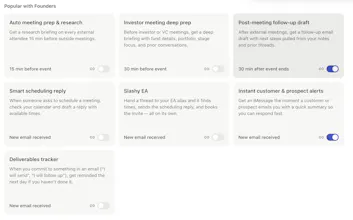
It helps me with everything. Meeting invites, managing my calendar, searching for past emails, composing outreach, responding to customers, and giving me feedback on the few manual emails I still write.
Slashy makes me a pro at the small annoying things so I can get back to the part of my job I actually like. Good product, can't wait to try out the new agent. Congrats guys!
Slashy
@mklikushin Thanks Michael appreciate all the kind words :)
Congratulations on the launch! Can I connect Slashy with my ai note taker tool tactiq?
Slashy
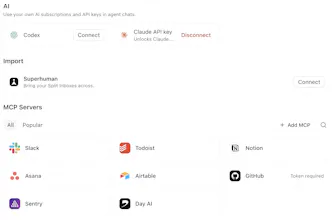
@heyitsirenechan yep Slashy has external mcp support so you can connect almost any tool :)
skillsync
Early user here, ngl I would be very disappointed if I could no longer use it
Slashy
@nars <3
Omnara
Nice, being able to send an email from wherever I have the idea and see the context (slack especially!), not just the email client, is a great addition in Slashy.
Slashy
@kartik_sarangmath1 Glad to hear Slashy's working great for you
Been using this for the past 2 months! It's my dream email client. Can't wait for the upcoming features :)
Slashy
@ryanjunejo Excited as well :)
Browzer
Slashy
@rahulkumaran4 appreciate it <3