
Silcrate
Native Mac app for Apple's container runtime
7 followers
Native Mac app for Apple's container runtime
7 followers
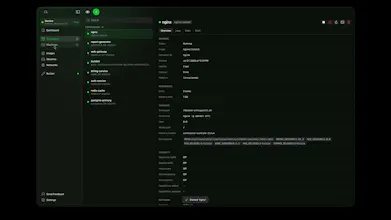
Silcrate is a native macOS GUI for Apple's container CLI — manage containers, Linux machines, images, volumes and networks on Apple silicon in one calm SwiftUI app. Free. Signed and notarized, no account required. Requires macOS 26 on Apple silicon.




Free
Launch Team

Atlassian LoomShow, don't just tell with Loom
Promoted
Hi Product Hunt 👋
I built Silcrate because Apple shipped something interesting and under-used: an open-source container runtime for Apple silicon that runs Linux containers as lightweight VMs. It’s a genuinely good engine, and it’s CLI-only.
Silcrate is the Mac-native front end for it. Lifecycle management with bulk operations, persistent Linux machines, BuildKit builds, Docker Hub search, volumes and networks, live log streaming, embedded PTY shells, and real-time telemetry streamed from the engine into native charts.
It’s SwiftUI throughout, so it behaves like a Mac app — light and dark, menu bar, keyboard-driven, no Electron.
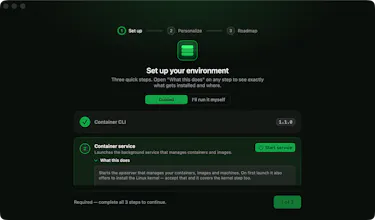
You don’t need to set the runtime up by hand. First launch walks you through it — Silcrate checks for Apple’s container CLI, the kernel and the background service, and installs or updates whatever’s missing for you. If you’d rather not install anything yet, there’s a demo mode that renders every screen with no runtime at all.
Being straight about two things:
• It needs macOS 26 on Apple silicon, and nested virtualization needs M3 or newer. That’s an Apple engine constraint, not a choice I made.
• Silcrate is closed source. The GitHub repo hosts signed releases and the update feed, not the app source. Apple’s container runtime is the open-source part.
The app is free and the free features stay free. A premium tier is planned for later — background service, auto-restart, crash alerts, backup/restore — as an optional add-on on top of it.
I’ll be here all day. I’d most like to hear from people already running containers on a Mac: what’s missing?
Really exciting to see Silcrate launch! Native Mac app for Apple's container runtime feels like a thoughtful approach. Congratulations, and best of luck today! 🚀