
Sider Omni Sidebar
Give every Mac app an Agent Sidebar
720 followers
Give every Mac app an Agent Sidebar
720 followers
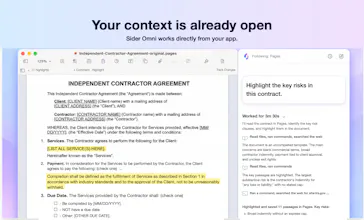
An AI agent beside any Mac app. Sider Omni sidebar sees what's on your screen and acts on it directly, right where you're working. Watch the result, ask for the next change. Nothing to copy, nothing to upload. Built on GPT-6 Astra, and it can run on your existing ChatGPT or Codex credits.



Free Options
Launch Team / Built With


Framer AI AgentsDesign and publish professional sites with AI
Promoted
Congrats on the launch , It operates offline or in low band -width conditions?
@easeops Thank you! AI processing currently requires an internet connection. Text and interface-based tasks are generally lighter on bandwidth, while tasks involving screenshots and visual understanding depend more on the quality of the connection.
Congratulations on the launch! Having the bot by the side of the application rather than in another separate chat window is the right approach in my opinion.
@hamza_aafzal Thank you! We wanted you to be able to ask for help or get something done without stepping away from what you’re working on.
I like that the assistant stays close to the context instead of forcing you to jump into a completely separate app.
@salisu_abubakar3 Thank you! Keeping the assistant beside the current window means fewer interruptions and no need to leave what you’re working on just to get help.
The sidebar approach is simple, but I can see it becoming surprisingly useful once it becomes part of your daily workflow.
@yusuf_sadi_sokmen Thank you! It keeps you in your flow without interrupting your train of thought. Fewer app switches and less copy-pasting throughout the day can add up to a lot of saved time.
Hey everyone 👋
Omni Sidebar docks to whatever window you're in — Word, Excel, Keynote, Notion, Obsidian, Safari, Mail, PDFs — and follows it when you move, resize, or go fullscreen. No copy-paste, no plugins, no switching apps to ask a question.
Each window gets its own thread, so context stays clean. Pick your own model. And it only reads a window when a task actually needs it — permissions are separate and revocable, and everything runs through a local agent on your Mac.
Mac only for now, and still early. Give it a spin and tell us what breaks — every bit of feedback shapes what ships next.
Would love your support and your upvote today 🙌
Love that it acts right on your screen without any copy paste, keeping you in flow instead of pulling you into yet another chat window.
@ilko_kacharov Thank you! We want AI to come to where you work, instead of making you move your work into another chat box. Sider Omni stays beside the current app and helps you get things done right there.
Congrats, #3 is well earned. One question from someone who ships an MCP server: can the sidebar talk to outside MCP servers, or only its own built-in tools? Use case is simple, I'm in Keynote or PowerPoint, I ask the sidebar for a deck, and it hands the brief to my tool and drops the file back in the app I'm already in. If MCP is on the roadmap I'd happily be a test case.
@thicreator Thank you! Sider Omni already supports external MCP servers, including local stdio and remote HTTPS servers—it isn’t limited to built-in tools. Your workflow fits the design perfectly: hand the brief to your MCP tool, generate the deck, and let Sider Omni bring the file back into Keynote or PowerPoint. We’d be very happy to test it with you and your server!
@thappcode remote HTTPS with OAuth is exactly our setup, so this should just work. Ours is at askdeck.ai/developers/mcp if you want to point the sidebar at it. Happy to test from my side too, will report back with what the handoff into PowerPoint looks like.
@thicreator Awesome, thanks for sharing the endpoint! We’ll try connecting AskDeck and see how smoothly the deck moves into PowerPoint. I’d love to compare notes with your test results and see what we can improve.