SideDoor Tasks is a small Mac utility for people who already use Apple Reminders, but hate opening a whole task manager just to add, edit, or complete one little thing Hit a hotkey, handle the reminder from a floating keyboard-first panel, then get back to what you were doing. Your tasks still live in Reminders. No new account, no analytics, no separate database, no subscription.
No reviews yetBe the first to leave a review for SideDoor Tasks
Maker
📌
Hey all — SideDoor Tasks was built to give me a faster way in and out of Apple Reminders.
I’d be in the middle of something, remember a task, have an idea, or think of some tiny loose end I didn’t want to lose. But getting it into Reminders still meant opening the app, clicking around, maybe checking something else while I was there, and suddenly this two-second thought had turned into a context switch.
SideDoor Tasks is basically a side entrance into the same Reminders setup you already use. Hit a hotkey, add/edit/check off a task from a floating panel, then get out. Your tasks still sync through Apple Reminders, so there’s no new account, no separate database, and no new task system to migrate into.
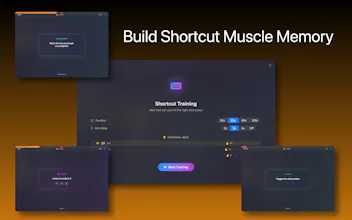
It’s very intentionally Mac-first and keyboard-first. It’s not trying to replace Apple Reminders or become a giant project management platform. It’s for people who already like Reminders, but wish the everyday interactions felt more like Spotlight: quick, focused, and gone when you’re done. There’s also a shortcut training mode built in, so you can quickly learn the keyboard flow.
A few things I cared about while building it:
– no subscription
– no account
– no telemetry
– no separate task database
– native Mac app
– works with the Reminders setup you already have
– shortcut training for getting faster over time
This is also the first app in what I’m hoping becomes a small family of SideDoor utilities for Apple apps — Calendar, Files, Contacts, and maybe a few others if this one takes off.
I’d genuinely love feedback, especially from Mac people, keyboard-shortcut people, and anyone with strong opinions about Apple Reminders. Does the positioning make sense? Anything feel confusing, missing, or overbuilt?