Stuck without a proper sharing tool? Want to privately share phone photos/videos with family or friends beside you, back up your photos/videos to a computer, or send a URL from phone to PC — but no convenient way to do it? ShareEasy fixes all of that. Transfer files at full Wi-Fi speed over your local network — no internet required, no account needed, no file size limits. Works seamlessly across Android, iOS, Windows, and macOS. Windows and macOS versions are completely free with no ads.
No reviews yetBe the first to leave a review for ShareEasy
Maker
📌
Hey Product Hunt! 👋 I'm the maker of ShareEasy, and super excited to share it here today.
Let me ask you something — have you ever wished for an app that could:
• Share photos/videos with family/friends beside you — no internet, no cloud, completely private?
• Transfer files without signing into any account or cloud service first?
• Back up thousands of phone photos/videos to your computer — no cable, ultra-fast transfer?
• Send a URL or text snippet from your phone to your PC to open it instantly?
And found there was just no good way to do it?
That's exactly what ShareEasy was built to solve. It transfers files at full Wi-Fi speed over your local network — no internet connection, no cable, no account, no size limits. Works across Android, iOS, Windows, and macOS.
Here's what it can do:
⚡ Ultra-fast transfers at full local Wi-Fi speed — no throttling, no upload wait 📱 All platform combos work: Android ↔ iOS ↔ Windows ↔ Mac 🖼️ Share photos, videos, and audio or files from phone to any device on the LAN 📋 Copy & paste text and URLs instantly across phone, tablet, and computer 📦 Transfer APKs between Android devices with auto-install 🔌 Works over Wi-Fi or personal hotspot — zero internet needed 🔍 Devices auto-discovered on the LAN — zero setup required 🚫 No account. No cloud server. Your files never touch a server.
🎁 Special offer for the Product Hunt community:
• iOS users — claim your free Pro unlock code: https://forms.gle/bZT1hjC35fjazmCf7 (We'll email your code within 24 hours. Expires June 10, 2026.) How to redeem: Open App Store → tap your profile photo → Redeem Gift Card or Code → enter your code
• Android users — redeem on Google Play with code: SHAREEASYVIP (30-day VIP free trial, valid until June 13, 2026.) How to redeem: Open Google Play → tap your profile photo (top right) → Payments & subscriptions → Redeem code → enter SHAREEASYVIP
🆓 macOS versions are 100% free — no in-app purchases, no ads.
🆓 Windows versions are 100% free — no in-app purchases, no ads. (Download: https://www.xinyiwe.com)
Download links for Android, iOS, macOS, and Windows are all in the post above.
Would love to hear from you — what's your biggest file-sharing headache right now? Any feedback after trying ShareEasy is incredibly welcome. 🙏


Hey Product Hunt! 👋 I'm the maker of ShareEasy, and super excited to share it here today.
Let me ask you something — have you ever wished for an app that could:
• Share photos/videos with family/friends beside you — no internet, no cloud, completely private?
• Transfer files without signing into any account or cloud service first?
• Back up thousands of phone photos/videos to your computer — no cable, ultra-fast transfer?
• Send a URL or text snippet from your phone to your PC to open it instantly?
And found there was just no good way to do it?
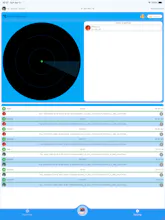
That's exactly what ShareEasy was built to solve. It transfers files at full Wi-Fi speed over your local network — no internet connection, no cable, no account, no size limits. Works across Android, iOS, Windows, and macOS.
Here's what it can do:
⚡ Ultra-fast transfers at full local Wi-Fi speed — no throttling, no upload wait
📱 All platform combos work: Android ↔ iOS ↔ Windows ↔ Mac
🖼️ Share photos, videos, and audio or files from phone to any device on the LAN
📋 Copy & paste text and URLs instantly across phone, tablet, and computer
📦 Transfer APKs between Android devices with auto-install
🔌 Works over Wi-Fi or personal hotspot — zero internet needed
🔍 Devices auto-discovered on the LAN — zero setup required
🚫 No account. No cloud server. Your files never touch a server.
🎁 Special offer for the Product Hunt community:
• iOS users — claim your free Pro unlock code: https://forms.gle/bZT1hjC35fjazmCf7 (We'll email your code within 24 hours. Expires June 10, 2026.) How to redeem: Open App Store → tap your profile photo → Redeem Gift Card or Code → enter your code
• Android users — redeem on Google Play with code: SHAREEASYVIP (30-day VIP free trial, valid until June 13, 2026.) How to redeem: Open Google Play → tap your profile photo (top right) → Payments & subscriptions → Redeem code → enter SHAREEASYVIP
🆓 macOS versions are 100% free — no in-app purchases, no ads.
🆓 Windows versions are 100% free — no in-app purchases, no ads. (Download: https://www.xinyiwe.com)
Download links for Android, iOS, macOS, and Windows are all in the post above.
Would love to hear from you — what's your biggest file-sharing headache right now? Any feedback after trying ShareEasy is incredibly welcome. 🙏