Launching today

Shapely 3D
3D Modeling Made Simple for Mac, iPad & iPhone
2 followers
3D Modeling Made Simple for Mac, iPad & iPhone
2 followers
Sketch, sculpt, and export real 3D models on Mac, iPad, and iPhone. Primitives, grid snapping, live measurements, View in Room at real size, Apple Pencil, CSG booleans, and STL export — one purchase, no subscription.

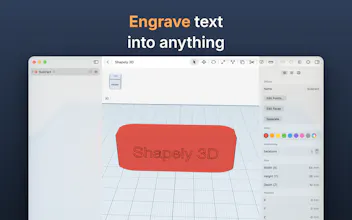


We built Shapely 3D because we wanted a Tinkercad-style 3D editor that feels at home on a Mac, iPad, and iPhone. That meant something native and fast that works offline, not a web app squeezed onto a touchscreen.
The idea is simple. Drop shapes on a workplane, move, rotate, and scale them with on-canvas gizmos, combine them, and export an STL that’s ready to print.
A few things we’re proud of:
Apple Pencil support: sketch a profile and extrude it into a solid. Squeeze to switch between Pen and Freehand, and hover to see where the next shape will land.
Printability check: it finds the holes and inside-out faces your slicer would trip on, and shows them in red before you print.
View in Room: see your part on your desk at its real size before you spend filament on it.
Open in Bambu Studio or PrusaSlicer: one click on the Mac.
Spotlight, Siri and Shortcuts: your projects show up in all three, plus a native look and feel in light and dark mode.
The core editor is free. Shapely 3D Pro is a one-time purchase, with no subscription. It unlocks booleans, STL export, sketching, smoothing, the cut tool, Edit Faces and Repair.
We’re a small team and we read everything, so we would love your feedback. What would you build first, and what’s missing for your workflow? 🙏