
Seek - Ctrl+F for YouTube videos
Search what was said. Jump instantly to the exact moment.
8 followers
Search what was said. Jump instantly to the exact moment.
8 followers
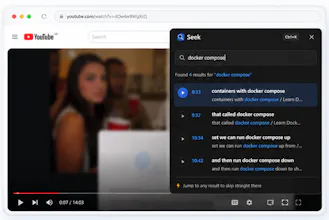
Seek is a Chrome extension for YouTube watch pages. Ctrl+K opens a search over the transcript so you can jump to where something was said. Think Ctrl+F for spoken content. YouTube’s native transcript panel works, but it’s slow to scan. If you’re halfway through a forty-minute talk and want the bit where someone mentions “context window”, you’re scrolling a wall of text or scrubbing the timeline and hoping. I kept doing that on tutorial videos and conference talks, and I wanted a faster way in.

Free
Launch Team

Framer AI AgentsDesign and publish professional sites with AI
Promoted
does it pick up the transcript automatically or do you have to manually paste it in for each video
@abantakanancyy hey, yes it auto picks it up for the video. It doesn't even need to be enabled, as long as the video does have a transcript or captions.
Does it work on videos that have auto-generated captions but no proper transcript uploaded by the creator, or does it need a real transcript file to index?
This is exactly what I needed for long tutorial videos. Searched "regex" in a coding talk and it jumped right to the explanation. Way faster than scrubbing.
Does it handle videos that have auto-generated captions, or does it only work when there's an actual transcript uploaded by the creator?
the ctrl+k shortcut is a nice touch, feels right at home next to other browser shortcuts and way faster than scrolling through the native transcript.