
Schematic World
The automated library manager & toolbox for Proteus Design.
13 followers
The automated library manager & toolbox for Proteus Design.
13 followers
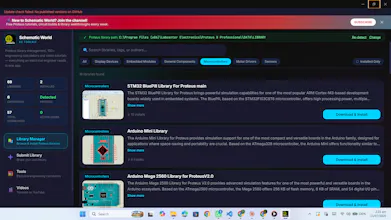
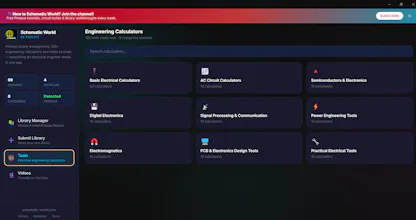
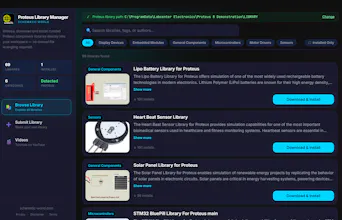
Stop wasting hours hunting down rogue schematic symbols and PCB footprints on dead forums. Schematic World is a 100% free desktop companion app built to supercharge your Proteus Design Suite workflow. It features automatic local directory detection to install or cleanly wipe community-contributed libraries in a single click. To keep you entirely inside your zone of focus, it also packs a massive built-in engineering suite of 100+ calculators, guides, and pinout references.




Free
Launch Team / Built With


Framer AI AgentsDesign and publish professional sites with AI
Promoted
How does it actually handle library conflicts when the community folder already has symbols that overlap with what you are trying to install?
@havavyad
Thanks for asking! Right now, it doesn't handle overlapping conflicts directly.
When duplicate files are placed into the Proteus library folder, Proteus shows a pop-up and skips adding them. However, our app doesn't currently detect that the file was skipped or notify you that it was already installed—it just shows as "not installed through us."
That's definitely an edge case we missed, and we'll look into handling conflict detection better in a future update!
How does it handle updates when community libraries change, do users need to manually re-import or does it sync automatically in the background?
@sabriatasavun Thanks for asking! Currently, there is no automatic background syncing.
Because of how community contributions work, updates are released as distinct new entries rather than overwriting existing files—for example, an updated component would be published under a new tag like "Sensor V2."
To get the updated version, you simply remove the older version and install the new, updated library as an individual package through the app.
Finally gave this a spin and the one-click library wipe alone is worth it, no more leftover junk clogging up Proteus. The pinout reference section is surprisingly handy when you just need a quick answer without alt-tabbing.
@asiyeenisoczbn Finally gave this a spin and the one-click library wipe alone is worth it, no more leftover junk clogging up Proteus. The pinout reference section is surprisingly handy when you just need a quick answer without alt-tabbing.
Took it for a spin on a Proteus project I was stuck on and the one-click library install actually just worked, no config fuss. The pinout references alone saved me from digging through old PDFs.
@ravza1134309 Thanks so much for testing it out on a real project!
the auto-detection for Proteus library directories is a really thoughtful touch, makes swapping in community libraries feel almost invisible. love that it bundles pinouts and calculators in the same window so you never have to alt-tab out mid-design.
@sercanna3c Thanks for your feedback
Took it for a quick spin last night and the local directory detection works exactly as promised, dropped the new libs into Proteus without touching a single path setting. Genuinely useful having the calculator suite tucked in the corner too, saved me a tab or two while sizing some resistors.
@saliha464180 thanks