Scene turns your Mac into a one-click context switcher. Build Workspaces that snap windows into layouts, launch/quit apps, and toggle Focus — fired by hotkey, menu, monitor plug-in, time of day, or calendar event. Menu bar only. No cloud. No tracking. Free.
No reviews yetBe the first to leave a review for Scene
Maker
📌
Hey Product Hunt — I'm Hillman, the solo maker of Scene.
I kept doing the same three-step dance every time I switched contexts: rearrange windows, quit the apps I don't need, launch the ones I do, flip Focus mode. There are great tools for each piece individually — Rectangle, Raycast, Shortcuts — but I wanted one thing that owned the whole switch.
Scene is built around **Workspaces** (情境): a bundle of window layout + apps to launch + apps to quit + a macOS Focus mode. Fire it with ⌘⌥1, or let it fire itself when you plug in your external display, when the clock hits 9am on weekdays, or when a "Deep Work" calendar event starts.
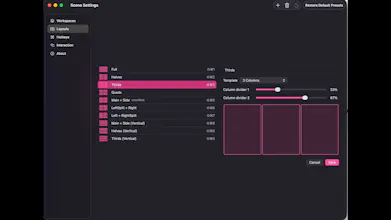
Just want window snapping? That works standalone too — ⌘⌃1 through ⌘⌃0 bind to ten layout presets (halves, thirds, 2x2, 3x2, L-shapes), and you can drag the proportions in Settings.
A few things that mattered to me in the build:
- Native Swift, zero dependencies, no Electron
- Zero network calls, no accounts, no telemetry — the app never phones home
- Developer ID signed + notarized by Apple
- Localized from day one in English and Cantonese.
- Free
Three things I'd love your honest take on:
1. What actually triggers a context switch for you — calendar, time of day, plugging in a monitor, something else?
2. Would per-display layouts (a different Workspace per screen) change how you'd use it?
3. What's the one app or macOS feature you'd want Scene to integrate with that it doesn't yet?
Thanks for taking a look — I'll be in the thread all day.