SayCraft turns a real-time team meeting into a working web app. You talk — alone or with your team — the AI builds live, and a shareable preview URL updates as you speak. Walk away with a working product, the source code, and one-click deploy. No prompts.
No reviews yetBe the first to leave a review for SayCraft
Hunter
📌
Hey Product Hunt 👋 I'm the founder.
I went from backend to full-stack to build my own products, and the part that slowed
me down wasn't code — it was that every AI builder makes one person type prompts. The
products I cared about always got decided by a few people *talking* it out.
SayCraft is shaped like that conversation. Open a meeting, talk (solo or with your
team), and the AI builds the web app live — a shared preview URL updates sentence by
sentence, so everyone reviews the same thing as it's built. You leave with a working
app, the source code, and one-click deploy.
It's free to start (no card). 60-second demo:
I'd love to hear what you'd build with it — I'm here all day answering everything.
Report
Turning a live meeting into a build session with a preview URL that updates as you talk is a genuinely different loop from prompt-by-prompt, and the no-prompts claim is the part I'd want to stress-test. When two people talk over each other, how does it decide whose intent to build, and can I correct or roll back a wrong inference mid-meeting without stopping the session? Also, does the source you walk away with come out as a normal repo I own and can keep iterating on in my own editor, or is it tied to your platform to stay runnable?
Great questions — this is exactly the part worth stress-testing, so let me be specific.
Two people talking over each other / conflicting intent: it doesn't quietly pick a "winner" behind your back. When there's a real disagreement, you can just have it build both directions and actually try each one live, then decide by feel instead of arguing about it in the abstract. And the session replay keeps every intermediate state, so you can scroll back through every form it passed through along the way — nothing gets lost.
Correcting a wrong inference mid-meeting: yep, no need to stop. You just say it — "no, go back to the simpler header," "make it the other version" — and the UI updates live as you talk. Course-correcting by speaking is the loop; there's no restart, no re-prompting.
The code you walk away with: completely platform-independent. It's a normal, complete, genuinely runnable codebase you own — clone it, open it in your own editor, keep iterating. Nothing's tied to us to stay runnable.
Honestly the best way to test the "no-prompts" claim is to run a real session and try to break it — would love to hear how it holds up for you.
Report
Build-both-directions plus a scrollable replay of every intermediate state is a smarter conflict model than forcing a winner up front. Where does the live session itself run during the meeting, though, the transcription and evolving build state, on your servers or locally on the machine driving it? And once I clone the repo out, does that session replay stay openable later or does the history only live on your platform?
The live session runs on our servers — the transcription and the evolving build state are all server-side, so the machine driving the meeting is basically just talking and watching the preview. Nothing heavy runs locally.
And the replay is permanent and lives on our side, so it stays openable forever — independent of whether you've cloned the repo. The code you clone is yours to run anywhere; the session replay is a separate artifact that always opens at its share link. Here's a real one (an interactive 3D solar-system explorer, built live in a meeting): https://saycraft.ai/share/By4GWlfmDx6
One more thing you might like: when the meeting ends, it one-click deploys, so the product is instantly live and shareable. Here's the deployed app from that same session → https://elzgw4qyo3e.flashdesign.tech
Report
The build-both-directions plus full session replay is a sharper answer than I expected, being able to scroll back through every intermediate state is what makes 'no winner picked behind your back' actually trustworthy. The one piece I still want to pin down is the walk-away: when I take the source and one-click deploy, does the exported app run fully standalone in my own repo and host, or does it still call back to SayCraft's runtime to stay working? That standalone guarantee is what would decide whether I build something real on it versus just prototyping.
Report
Hunter
@noctis06 Yep — you've got two options, and it's completely up to you.
Want the fastest path? We host it for you. One click and it's live on the SayCraft platform, ready to share.
Want full ownership? Just take the source code, keep building, and deploy it wherever you want—your own repo, your own server, your own cloud.
Once you've exported it, it's a completely standalone app. No SayCraft runtime, no callbacks, no hidden dependencies. It keeps working even if you never touch SayCraft again.
So if you're building something real, you won't be locked into us—we want you to own what you build.
Custom domains are coming soon too. You'll just point your DNS, and your app will be available under your own domain.
Report
Makes sense, the build-both-directions loop plus full session replay is exactly what sells it for me over prompt-by-prompt. When it forks both directions, are those kept as branches I can later cherry-pick from, or does choosing one discard the other? And does the replay/decision trail export with the codebase so a teammate who missed the meeting can walk it, or does replay only live inside SayCraft?
When it forks two directions, each one is a snapshot you can export — the code and a live link. So across a session you can end up with N snapshots of the different directions you explored; the final product is one codebase + link, but every path you considered stays retrievable. Less "pick one, lose the other," more "keep them all, ship the one you chose."
And it's all in git: the exported repo carries the full commit history — every step of the build is its own commit, so the entire intermediate process is right there in the log to walk, diff, or cherry-pick from in your own editor.
The replay travels too: the whole session — the conversation and the decision trail — is a shareable link, so a teammate who missed the meeting can just open it and walk the entire thing end to end. Here's a real one → https://saycraft.ai/share/By4GWlfmDx6
The no-prompts angle is what makes this click for me. Most AI coding tools still require you to be a decent prompt writer, which creates its own learning curve. Capturing intent from a natural team conversation is a fundamentally different bet - the product emerges from how people actually think and talk, not how they write specs. Curious how SayCraft handles disagreements or tangents mid-meeting though. Like when the discussion drifts into scope creep territory - does the AI pick up on the loudest voice, or the most recent direction?
Report
Hunter
For anyone who'd rather see it than take my word for it — here are a couple of apps built entirely by talking through a meeting, each with the live app and the full session replay so you can watch the conversation turn into the product:
The replay is the fun part: scrub through the actual session and watch the preview update sentence by sentence as the team talks. No prompts typed anywhere.
Report
The idea of building live interactive website seems a cool approach to start building mvp during meeting. However I had one question what is the main idea of this product? Is it to build a prototype and architectural structure during the meeting and then later on the teams can build actual products or is it to build a live end-to-end product during the meeting?
It's closer to your first one — think of it as getting the idea tangible, not shipping the finished product in the meeting.
Most teams (and solo founders) have an idea in their head, but it's invisible — hard to align on something nobody can actually see yet. SayCraft turns that into something you can see and click in minutes, live in the conversation, and when it drifts from what you pictured you just say so and it corrects on the spot. So you're sharpening a fuzzy idea into something concrete — cheaply and fast — and getting the whole team moving in the same direction.
It leans demo/prototype rather than a finished end-to-end product. But the code is real and exportable, so once the idea's clear, you can take it straight toward production.
Report
@ame_ame2 That's a good approach. Many times, founders face the problem that they have a a good idea in their head, but cannot make it into a reality, they cannot make the idea into a actual product. Your product really seems to speed up the process from an idea to reality, which can later be used to build an actual product.
Report
Hunter
@mahir21 Thank you! That's exactly the problem we're hoping to help with. Really appreciate the support !!
Report
Ame, this is a fascinating approach to the build process. Sitting in endless client discovery sessions and architectural meetings, the hardest part is always translating spoken requirements into functional code without losing context. Building it during the conversation is a massive paradigm shift.
Since the codebase is fully exportable, I am really curious about the underlying stack it generates. Is it primarily outputting a React/Next.js frontend, or does it also attempt to scaffold out the backend APIs and database schemas if the team starts discussing data structures? Huge congrats on the launch!
Report
Hunter
@varunvivek Thanks so much — really appreciate the support. And yeah, that "translating spoken requirements into code without losing context" pain is exactly what got me building this.
Straight answer on the stack: right now it outputs a **React frontend web app, and that's it.** Today the focus is turning a live conversation into something you can *see and click* in real time, so it runs on mock data rather than real persistence. If the team starts talking data structures, it'll model them in the UI — lists, forms, the shapes of things — but it won't scaffold real backend APIs or a database yet.
That's the deliberate v1 scope: the fast "talk → watch it appear" loop for **real-time demos and prototypes**. Real backend / API / schema generation is squarely on the roadmap as it grows from a demo tool into something you'd ship end-to-end. And since the output is a clean, exportable React repo, you can always wire your own backend onto it in your editor in the meantime.
Thanks again for the thoughtful question — exactly the kind of feedback that helps me prioritize what's next !




Turning a live meeting into a build session with a preview URL that updates as you talk is a genuinely different loop from prompt-by-prompt, and the no-prompts claim is the part I'd want to stress-test. When two people talk over each other, how does it decide whose intent to build, and can I correct or roll back a wrong inference mid-meeting without stopping the session? Also, does the source you walk away with come out as a normal repo I own and can keep iterating on in my own editor, or is it tied to your platform to stay runnable?
@noctis06
Great questions — this is exactly the part worth stress-testing, so let me be specific.
Two people talking over each other / conflicting intent: it doesn't quietly pick a "winner" behind your back. When there's a real disagreement, you can just have it build both directions and actually try each one live, then decide by feel instead of arguing about it in the abstract. And the session replay keeps every intermediate state, so you can scroll back through every form it passed through along the way — nothing gets lost.
Correcting a wrong inference mid-meeting: yep, no need to stop. You just say it — "no, go back to the simpler header," "make it the other version" — and the UI updates live as you talk. Course-correcting by speaking is the loop; there's no restart, no re-prompting.
The code you walk away with: completely platform-independent. It's a normal, complete, genuinely runnable codebase you own — clone it, open it in your own editor, keep iterating. Nothing's tied to us to stay runnable.
Honestly the best way to test the "no-prompts" claim is to run a real session and try to break it — would love to hear how it holds up for you.
Build-both-directions plus a scrollable replay of every intermediate state is a smarter conflict model than forcing a winner up front. Where does the live session itself run during the meeting, though, the transcription and evolving build state, on your servers or locally on the machine driving it? And once I clone the repo out, does that session replay stay openable later or does the history only live on your platform?
@noctis06 Good questions —
The live session runs on our servers — the transcription and the evolving build state are all server-side, so the machine driving the meeting is basically just talking and watching the preview. Nothing heavy runs locally.
And the replay is permanent and lives on our side, so it stays openable forever — independent of whether you've cloned the repo. The code you clone is yours to run anywhere; the session replay is a separate artifact that always opens at its share link. Here's a real one (an interactive 3D solar-system explorer, built live in a meeting): https://saycraft.ai/share/By4GWlfmDx6
One more thing you might like: when the meeting ends, it one-click deploys, so the product is instantly live and shareable. Here's the deployed app from that same session → https://elzgw4qyo3e.flashdesign.tech
The build-both-directions plus full session replay is a sharper answer than I expected, being able to scroll back through every intermediate state is what makes 'no winner picked behind your back' actually trustworthy. The one piece I still want to pin down is the walk-away: when I take the source and one-click deploy, does the exported app run fully standalone in my own repo and host, or does it still call back to SayCraft's runtime to stay working? That standalone guarantee is what would decide whether I build something real on it versus just prototyping.
@noctis06 Yep — you've got two options, and it's completely up to you.
Want the fastest path? We host it for you. One click and it's live on the SayCraft platform, ready to share.
Want full ownership? Just take the source code, keep building, and deploy it wherever you want—your own repo, your own server, your own cloud.
Once you've exported it, it's a completely standalone app. No SayCraft runtime, no callbacks, no hidden dependencies. It keeps working even if you never touch SayCraft again.
So if you're building something real, you won't be locked into us—we want you to own what you build.
Custom domains are coming soon too. You'll just point your DNS, and your app will be available under your own domain.
Makes sense, the build-both-directions loop plus full session replay is exactly what sells it for me over prompt-by-prompt. When it forks both directions, are those kept as branches I can later cherry-pick from, or does choosing one discard the other? And does the replay/decision trail export with the codebase so a teammate who missed the meeting can walk it, or does replay only live inside SayCraft?
@noctis06
Nothing gets discarded.
When it forks two directions, each one is a snapshot you can export — the code and a live link. So across a session you can end up with N snapshots of the different directions you explored; the final product is one codebase + link, but every path you considered stays retrievable. Less "pick one, lose the other," more "keep them all, ship the one you chose."
And it's all in git: the exported repo carries the full commit history — every step of the build is its own commit, so the entire intermediate process is right there in the log to walk, diff, or cherry-pick from in your own editor.
The replay travels too: the whole session — the conversation and the decision trail — is a shareable link, so a teammate who missed the meeting can just open it and walk the entire thing end to end. Here's a real one → https://saycraft.ai/share/By4GWlfmDx6
Dial
The no-prompts angle is what makes this click for me. Most AI coding tools still require you to be a decent prompt writer, which creates its own learning curve. Capturing intent from a natural team conversation is a fundamentally different bet - the product emerges from how people actually think and talk, not how they write specs. Curious how SayCraft handles disagreements or tangents mid-meeting though. Like when the discussion drifts into scope creep territory - does the AI pick up on the loudest voice, or the most recent direction?
For anyone who'd rather see it than take my word for it — here are a couple of apps built entirely by talking through a meeting, each with the live app and the full session replay so you can watch the conversation turn into the product:
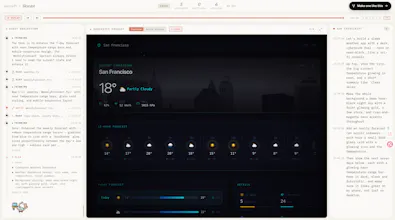
🌦️ Skycast — a weather app, dark cyberpunk theme
• Live app → https://emxtbkvilzv.flashdesign.tech
• Watch it get built (full meeting replay) → https://saycraft.ai/share/Ppj0zpSaVxf
🪐 Helios — an interactive 3D solar-system explorer
• Live app → https://elzgw4qyo3e.flashdesign.tech
• Watch it get built → https://saycraft.ai/share/By4GWlfmDx6
The replay is the fun part: scrub through the actual session and watch the preview update sentence by sentence as the team talks. No prompts typed anywhere.
The idea of building live interactive website seems a cool approach to start building mvp during meeting. However I had one question what is the main idea of this product? Is it to build a prototype and architectural structure during the meeting and then later on the teams can build actual products or is it to build a live end-to-end product during the meeting?
@mahir21
It's closer to your first one — think of it as getting the idea tangible, not shipping the finished product in the meeting.
Most teams (and solo founders) have an idea in their head, but it's invisible — hard to align on something nobody can actually see yet. SayCraft turns that into something you can see and click in minutes, live in the conversation, and when it drifts from what you pictured you just say so and it corrects on the spot. So you're sharpening a fuzzy idea into something concrete — cheaply and fast — and getting the whole team moving in the same direction.
It leans demo/prototype rather than a finished end-to-end product. But the code is real and exportable, so once the idea's clear, you can take it straight toward production.
@ame_ame2 That's a good approach. Many times, founders face the problem that they have a a good idea in their head, but cannot make it into a reality, they cannot make the idea into a actual product. Your product really seems to speed up the process from an idea to reality, which can later be used to build an actual product.
@mahir21 Thank you! That's exactly the problem we're hoping to help with. Really appreciate the support !!
Ame, this is a fascinating approach to the build process. Sitting in endless client discovery sessions and architectural meetings, the hardest part is always translating spoken requirements into functional code without losing context. Building it during the conversation is a massive paradigm shift.
Since the codebase is fully exportable, I am really curious about the underlying stack it generates. Is it primarily outputting a React/Next.js frontend, or does it also attempt to scaffold out the backend APIs and database schemas if the team starts discussing data structures? Huge congrats on the launch!
@varunvivek Thanks so much — really appreciate the support. And yeah, that "translating spoken requirements into code without losing context" pain is exactly what got me building this.
Straight answer on the stack: right now it outputs a **React frontend web app, and that's it.** Today the focus is turning a live conversation into something you can *see and click* in real time, so it runs on mock data rather than real persistence. If the team starts talking data structures, it'll model them in the UI — lists, forms, the shapes of things — but it won't scaffold real backend APIs or a database yet.
That's the deliberate v1 scope: the fast "talk → watch it appear" loop for **real-time demos and prototypes**. Real backend / API / schema generation is squarely on the roadmap as it grows from a demo tool into something you'd ship end-to-end. And since the output is a clean, exportable React repo, you can always wire your own backend onto it in your editor in the meantime.
Thanks again for the thoughtful question — exactly the kind of feedback that helps me prioritize what's next !