Launching today

SayakaCleaner
A calm Mac cleaner that moves nothing until you say so
2 followers
A calm Mac cleaner that moves nothing until you say so
2 followers
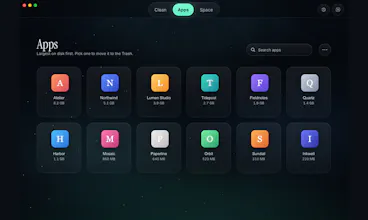
Your Mac fills up with caches, installers, Xcode data, build output and AI coding tool logs. SayakaCleaner finds them and lists each item with its size and why it was found. Nothing is pre-selected. Your picks go to the macOS Trash, so you can put them back.


Free Options
Launch Team

AWS Startup AdvisorPersonalized AWS guidance that meets you where you’re already building
Promoted
Hi Product Hunt! I'm Peter, the solo developer behind Genjux (genjux.app). I make small, calm apps for Mac, iPhone and Windows:
Lumadio (displays and per-app audio)
NeoWriter (Markdown writing)
Nautilus (a quieter Hacker News reader)
Bebilog (baby tracking)
Pixel Wonders (a nature painting game)
One promise across all of them: no app costs more than $19.99.
Today I'm launching SayakaCleaner, a Mac storage cleaner.
I built it because my Mac kept running out of space in this AI era, and most cleaners asked me to trust one big "Clean" button. A lot of my disk was Xcode build data, simulators, old build output and, lately, gigabytes of logs and caches from AI coding tools. I wanted a cleaner that shows exactly what it found and why, and then lets me decide.
What it does:
Clean: one scan of caches, installers, Xcode data, build output and AI tool logs (Claude, Codex, Copilot). Every item shows its size and the reason it was found. Nothing is selected for you.
Space: any folder drawn to scale, so you see what really fills the disk.
Apps: remove an app and choose whether its settings and caches go too.
How it stays safe: items move to the macOS Trash and are checked again just before they move. Only Empty Trash and erasing simulators are permanent, and each needs its own confirmation. No account, no analytics, no tracking.
Pricing: $8.99 once, a lifetime licence for 2 Macs. No subscription. Scanning is always free, and cleaning is free for 14 days. Signed and notarized, universal (Apple silicon and Intel), macOS 12 or later. English only for now.
I'd love your feedback, especially: what should it find that it doesn't yet?