
SaveAnswer
Save useful AI answers, then find them when you need them
16 followers
Save useful AI answers, then find them when you need them
16 followers
AI chats are useful until the answer you need disappears into a long history.
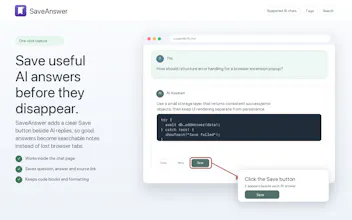
SaveAnswer is a local Chrome extension for keeping the replies you actually want to reuse. Click Save next to a supported AI reply, add tags if useful, then search saved questions and answers later.
Export selected saved answers as Markdown, Word, PDF or HTML. Exports keep the question, answer, tags, source link and timestamp. Saved items stay in Chrome local storage. No account, backend or cross-device sync.



Free
Launch Team

Framer AI AgentsDesign and publish professional sites with AI
Promoted
I built SaveAnswer after repeatedly losing useful explanations, checklists, and code snippets in AI chat history.
The problem for me was not that chat history did not exist. It was that I could remember a useful sentence or the question I asked, but not which conversation contained it. Browser history and bookmarks only took me back to a page, not to the answer itself.
SaveAnswer adds a Save button beside replies on the AI chat sites it supports. It keeps the question, answer, optional tags, and source link in Chrome local storage, so there is no account or SaveAnswer backend.
The trade-off is intentional: no cross-device sync, no automatic full-chat archive, and it cannot recover chats that were not saved before they disappeared. You can export selected saved answers as Markdown, Word, PDF or HTML. It is a small capture-and-retrieval layer, not a full notes app.
I would value feedback on one question: for replies you expect to reuse, what would make this easier to keep using—export, another supported chat site, or less manual organization?
Update for v1.0.15: SaveAnswer now exports selected answers as Markdown, Word, PDF or HTML. Markdown remains useful for agents and knowledge tools; Word, PDF and HTML make it easier to edit, share or open exports elsewhere. Every format keeps the saved question, answer, tags, source link and timestamp.
The privacy boundary is unchanged: saved content stays in Chrome local storage, there is no account or backend, and cross-device sync is still not available. I also refreshed the icon and demo media with a clearer evergreen product mark while keeping personal chat-history content out of the assets.
SaveAnswer 1.0.20 is now live:
1. ChatGPT 2026 DOM Redesign Support: Completely overhauled injection predicates to reliably attach the Save button next to the official action toolbar, even with ChatGPT's latest frontend architecture changes.
2. Unified 32px Standard: The Save button across all 7 supported AI platforms (ChatGPT, Gemini, Grok, DeepSeek, Claude, Doubao, Qwen) is now fixed at a clean 32px height with an explicit "Save" text label, immune to host CSS distortion.
3. Offline Canvas 2D Share Cards: Generate high-resolution PNG summary cards with 4 visual themes directly in your browser without uploading any data to external servers.
Privacy boundary remains strictly 100% Local-First: data stays in Chrome local storage with no account, no cloud servers, and zero telemetry.
Update for v1.0.6: SaveAnswer can now export the current search or tag-filtered results as Markdown. The export keeps the saved question, answer, tags, source link and timestamp, so selected answers can move into an agent or knowledge workflow without copying each item by hand.
The privacy boundary is unchanged: saved content stays in Chrome local storage, there is no account or backend, and cross-device sync is still not available. I also refreshed the demo media to remove personal chat-history content.
SaveAnswer 1.0.17 is now live. DeepSeek long chats now keep each Save button with its own AI answer. Also new: View original, export to Downloads or a chosen folder, PNG share cards, and a short onboarding. Local-only: no account, backend, tracking, or cross-device sync.