Launching today

SATF
Drag, shake, convert files on macOS & Windows
2 followers
Drag, shake, convert files on macOS & Windows
2 followers
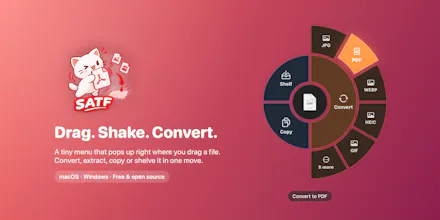
SATF is a free, open-source radial menu for macOS and Windows. Shake the file you're dragging, drop it on a format, done: images, PDF, Word, Excel, PowerPoint, video, audio and archives.



Free
Launch Team

Framer AI AgentsDesign and publish professional sites with AI
Promoted


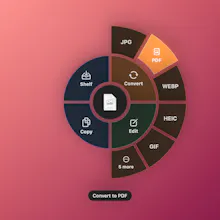
The idea: converting a file usually means opening an app, finding Export, picking a format and a folder. With SATF you keep dragging: give the file a little shake (or press ⌥⇧Space / Alt+Shift+Space), a radial menu appears under your cursor, and you drop the file on the format you want. The new file lands next to the original.
What it can do
Convert images (HEIC, PNG, JPG, WebP, AVIF…), PDFs, Word/Excel/PowerPoint, video and audio
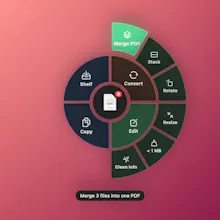
Quick edits: resize, compress, squeeze a photo under 1 MB, strip location/camera info, stack images
Merge several files into one PDF or one ZIP, split or rotate PDFs
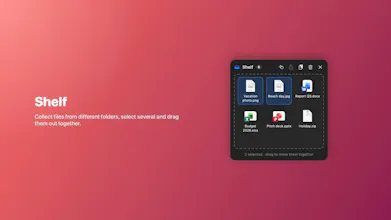
A floating Shelf to collect files and drag them out together
How it’s built
Two native apps instead of one cross-platform wrapper: Swift/AppKit/SwiftUI on macOS, C#/WPF on Windows, sharing the same design and settings.
Everything runs locally: no account, no analytics, nothing uploaded. Heavy tools (LibreOffice, FFmpeg) are optional add-ons, downloaded only if you need them.
The Mac build is signed & notarized; both apps update themselves from GitHub Releases (checksum + signature checks, no backend).
Builds with ./build.sh (Command Line Tools only, no Xcode project) and ./build-win.sh. CI runs real conversion tests on macOS and Windows runners.
Repo: https://github.com/tran-minh-khoi/SATF
It’s my first serious open-source project, so I’d really appreciate:
feedback on the code and the build setup,
bug reports (especially on Windows),
ideas for formats or edits you’d use.
Issues and PRs are very welcome. Thanks for reading!