SafeSteps AI keeps kids safe online — fully on-device. It reads on-screen text via Windows UI Automation (both what's typed and messages you click) and matches it against a threat engine: grooming, bullying, and privacy leaks. Only matched content is ever saved — anything not in the database is never stored. 100% local: no cloud, no servers, no screenshots, no keylogging. After activation it firewall-blocks itself from the internet. English + Hebrew.
No reviews yetBe the first to leave a review for SafeSteps AI
Maker
📌
Hi Product Hunt! 👋 I'm Ran, a cybersecurity & information-security student, and the maker of SafeSteps AI.
🎁 LAUNCH OFFER: SafeSteps is FREE for the next 5 days. After that it moves to an annual subscription — so if it's useful to you, now's the time to grab it.
🧩 WHY I BUILT IT
I built SafeSteps around one principle: a tool that protects kids online should never cost the family its privacy. So I designed it to run entirely on your own computer — your data stays with you, and everything I claim about it, you can verify yourself. As a security student, "just trust me" wasn't good enough — I wanted it to be provable.
🔍 WHAT IT IS & HOW IT WORKS
SafeSteps detects, in real time, dangers kids can face online — grooming, cyberbullying, and leaks of personal information — and alerts the parent.
It reads text shown on screen using the Windows Accessibility (UI Automation) API — both what the child types and the messages they click on in chats and browsers. That text is matched against a built-in threat engine covering grooming, bullying, and privacy leaks (ID, phone, credit-card numbers). You can also add your own keywords. Only content that matches the engine is ever stored — anything that isn't a match is never saved. Works in English and Hebrew, switchable in-app.
🔒 SECURITY & PRIVACY
• 100% on-device — no cloud, no servers, nothing is ever sent to me.
• After activation, the app blocks itself from the internet with a Windows Firewall rule you can open and see yourself.
• No screenshots, no keylogging — it reads displayed text only, and never reads password fields.
• Local data is encrypted with Windows DPAPI (readable only by that user on that machine).
• The parent code is never stored in plain text — it's hashed with PBKDF2-SHA256 (100,000 iterations + random salt).
• Detected events auto-delete after 30 days.
✅ TRANSPARENCY
The app isn't digitally signed yet (signing is an expensive yearly cost I plan to add later), so Windows may show an "unknown publisher" warning on install — that's normal: click "More info" → "Run anyway".
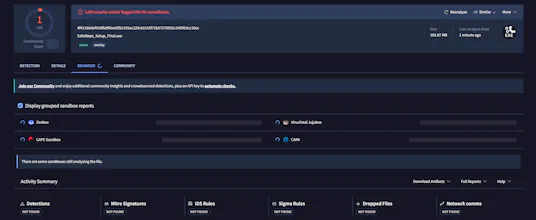
Instead of a certificate, I publish the installer's SHA256 hash so you can check the exact file on VirusTotal yourself. It currently shows 1 detection out of 70 — a single AI-based scanner. That's a common false alarm for new, unsigned apps; here it's triggered by the bullying phrases the app stores to detect them. All major engines (BitDefender, CrowdStrike, Kaspersky, Avast) come back clean, and VirusTotal's behavior analysis finds zero malicious activity. I'd rather show that 1/70 and explain it than hide it.
🚧 This is v1.0 — my first public launch. It's tested, but new software can have rough edges. Hit a bug? Email me and I'll fix it fast.
Thanks for checking it out — I'd love your honest feedback. 💙
— Ran