Saas Ignition

Saas Ignition

Stop Drowning in 100 Open Tabs of Research. Start Building.

3 followers

SaaS Ignition is your go to when you do not have the time to read that homepage, Instantly analyze any product URL (summaries, pricing, pros/cons), generate unique startup ideas by "mixing" existing tools, & finally Organize your competitive research in one place. Key Features: πŸ” Instant Product Anatomy: Paste a URL to get an immediate breakdown of features, pricing, and pros/cons. πŸ§ͺ Combine & Ideate: Merge the concepts of two existing apps to brainstorm unique "child" product ideas.
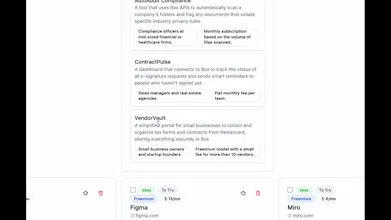
Saas Ignition gallery image
Free Options
Launch tags:SaaSβ€’Developer Toolsβ€’Maker Tools
Launch Team
Webflow | AI site builder
Start fast. Build right.
Promoted

What do you think? …

Michael
Maker
πŸ“Œ
Hey Product Hunt! We’ve all been there: 100 open tabs. And let’s not talk about the 1,000 bookmarks buried in folders named "Development", "Far Development", "Check out someday", or "Cool APIs if I ever get back to it". If you're like me, you hoard tools, competitors, and APIs for "later"β€”but later never comes. The cognitive load of managing that mess stops you before you even write a single line of code. I built SaaS Ignition to organize that chaos for myself and it has become my own go to tool, so today I share with you. It stops the hoarding and starts the building. Instead of a bookmark graveyard, you get an active workspace that does the heavy lifting for you: Instant Analysis: Paste those "someday" links. Get an instant, readable bio on the features, pricing, and pros/cons. The "Idea Mixer": Stop passively collecting. Select two or three tools you bookmarked and the system combines them "What if these two had a baby?" Manage the Mess: Actually the tools you've tried and don't need, or have uses for later, and leave notes! Turn that folder of "Cool APIs and other development resources" into your next shipped product.