
RUSTWA
A Unofficial WhatsApp Web API built in Rust
53 followers
A Unofficial WhatsApp Web API built in Rust
53 followers
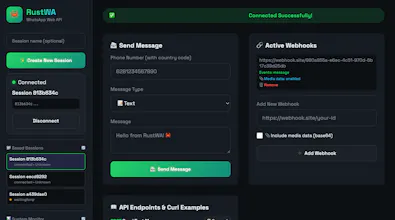
No feature bloat. No crazy configs. Just the stuff most people actually need: ✅ send text + media ✅ receive messages via webhooks ✅ multi-session support ✅ QR login with session persistence ✅ web dashboard ✅ fast async runtime with Tokio The goal: cover ~90% of automation use-cases without turning into a monster system. If you’re building WhatsApp automation, bots, or internal tools — would love for you to try it and tear it apart 😄 Feedback, issues, and PRs are more than welcome.


Free
Launch tags:Messaging
Launch Team

Tines The single, secure environment for agents, apps, and automations.
Promoted
@buyung_bahari
Solid choice with the Rust + Tokio stack! 🦀 Managing headless Chrome instances is usually a memory nightmare, so using Rust here makes perfect sense for efficiency.
Quick question: How does it handle session persistence if the container restarts? Do I need to re-scan the QR code every time, or does it save the session state locally?
Congrats on the launch!
@arsene94 Thank you! I really appreciate that 🙌
Yes — sessions are persistent. The service saves the session state locally and automatically reloads and reconnects when it restarts, so you don’t need to re-scan the QR code each time.
If you want to see it in action, just download the binary that matches your OS and give it a try — would love to hear your feedback after!
Congrats on the launch — clean, focused WhatsApp automation with Rust is super promising 👏
@zeiki_yu Thank you for your support