
Ring Light for Mac
Good light on camera, in every app, on any mac.
8 followers
Good light on camera, in every app, on any mac.
8 followers
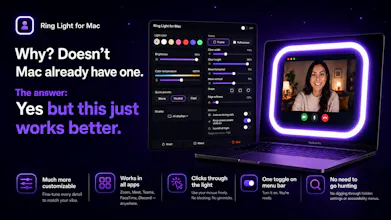
Your camera is only as good as your light, and most rooms don't have it. Apple's screen "edge light" only works in video calls. Ring Light for Mac works in every app (Zoom, Meet, Teams, WhatsApp), on any Mac. It turns your screen into a bright, soft ring of light around your video, so your face is lit, not lost in the dark. Fully customizable: brightness, warm-to-cool color, size, and shape, all a click away. One click on. Free, pay what you want.


Free
Launch tags:Menu Bar Apps
Launch Team

ArticosTest your messaging on your audience, right inside Claude or ChatGPT
Promoted
Quick heads-up for anyone downloading 👇
Since I haven't paid Apple's $99/year notarization fee (keeping this a cheap little indie app), macOS may say it "can't verify" the app the first time you open it. It's completely safe — I ran it through VirusTotal (60+ antivirus engines) and 0 flagged it:
https://www.virustotal.com/gui/file/8282e99cbb9bd05a8f366a84b4513d2a3993ce39d999b42de138d7f7e0791061
To open it (one time, ~20 sec):
Double-click the app → click Done on the warning.
System Settings → Privacy & Security → scroll down → Open Anyway.
Confirm with Touch ID/password — done. Opens normally after that.
(The same steps show up in the download window too.) Happy to help anyone who gets stuck — just reply here! 💜
the concept is clever but I'm skeptical about real-world lighting quality. a ring light works because it's a physical source in front of your face - using your screen as the light source puts illumination below or to the side depending on your setup, which can actually be less flattering than good overhead ambient. what's the practical lux output vs a $20 clip-on ring light? also curious about the MacBook battery hit from running screen at full brightness for a 1hr call.
@galdayan Appreciate this feedback. You know your lighting, and you're right on the physics.
TLDR- It's a lazy and convenient solution for free.
Honest take: it's not trying to out-muscle a real ring light. It actually grew from Apple's own "Studio Light" (the edge-light toggle in FaceTime's camera settings). Neat idea, but too dim and FaceTime-only. Mine works in any app, on any Mac, and goes way past a faint glow, with adjustable brightness, warmth, size, shape and color.
I built it around a real problem: a lot of people I work with would never bother setting up a physical light for a quick call. They just want to not look like a shadow. Something is better than nothing, right?
Lux: haven't metered it, so I won't pretend it beats a clip-on. A full-white screen is maybe 100 to 150 lux at sitting distance, and a $20 ring light wins on raw output. Where mine shines is the dark. Near-zero to 100+ lux of soft, even light is night-and-day for evening or outdoor casual calls, which is exactly what I built it for. Plus it's free (pay what you want), no hardware, always there.
Battery: no extra drain beyond your screen brightness itself, since it just paints bright pixels. An hour maxed is about the same as running your laptop at 100% brightness for an hour, and dimmer is proportionally less.
Not a studio replacement, and not pretending to be.