Capture pixel-perfect, full-page screenshots across multiple breakpoints without losing quality. Rescreen comes packed with 5 hover-driven inspectors to instantly copy element styles and dimensions in one click. Plus, use the companion Figma plugin to auto-import and arrange your captures seamlessly. Built by a UX designer for effortless visual documentation.
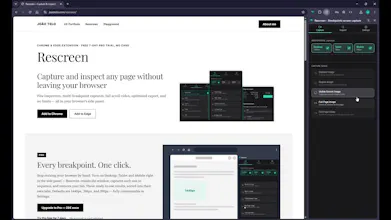
High-quality visual documentation is essential for UX Design, yet capturing accurate full-page screenshots and inspecting elements always felt fragmented. I found myself juggling multiple extensions that yielded sub-par results.
To solve this, I created Rescreen: a streamlined, all-in-one browser extension, built for speed, accuracy, and pixel-perfect quality.
• Element, region, visible-screen or full-page screenshots
• Full-page scroll video, at your own recording speed
• Multi-breakpoint capture — Desktop, Tablet and Mobile in one pass, sorted into their own tabs (PRO)
• Optimized export — slice a tall capture into full-resolution blocks or compress it, to fit Figma, Miro, Slack or email limits
• Free companion Figma plugin — drops sliced blocks back into place as organized, labeled frames
• Export images in traditional formats such as PNG and PDF, or as video.
• Five hover-driven inspectors — typography, colors, spacing, image and text, with an element's real :hover state revealed via Caps Lock
• Automatic light/dark theme, matching your browser
• Runs 100% locally — no account, no sign-up, nothing sent to a server
• Available for Google Chrome and Microsoft Edge
Install it if you're a designer or developer who needs pixel-accurate specs and clean handoffs — but just as much if you simply want a good screenshot or PDF of a long page: a report, a presentation, an online receipt, anything you'd otherwise fight with a print dialog or a clunky screenshot tool. One click gets you a full, high-quality capture in the format you actually need.
Available in English, Spanish, and Portuguese (Brazil and Portugal).
Check it out and hit me with any feedback.