No reviews yetBe the first to leave a review for Renditions
Maker
📌
Hey Product Hunt! 👋
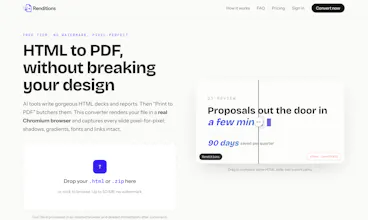
I built Renditions after watching the same scene play out dozens of times: someone (me) builds a stunning deck with Claude or ChatGPT, gradients, glass effects, custom fonts & then hits Ctrl+P to share it as a PDF… and it comes out broken. Black gradient text, missing shadows, slides sliced in half.
The problem is that Print to PDF re-renders your design for paper through a pipeline built decades ago. So Renditions skips it entirely: it loads your HTML in a real headless Chromium browser, detects the slide structure (even JavaScript-navigated decks and Reveal.js), and captures every slide at 2x resolution. The exact pixels the browser renders are what end up in your PDF — one page per slide, links still clickable.
A few things I care about:
• Free tier with no signup and no watermark
• Files are deleted right after conversion
• Works with Claude Design exports as-is (drop the zip, don't even unzip it)
• JPG/PNG output too, for ad creatives
I'd love your feedback -> especially weird HTML decks that break it. Ask me anything!
Report
finally tried this on a messy slide deck with gradients everywhere and the output actually kept the shadows intact, no clipping or weird font swaps like other converters i have used.
Report
Maker
Thanks @nisa262056 ! Messy decks with gradients everywhere are honestly the best stress test, and it's usually where converters fall apart with clipping and font swaps. Really happy it held up. If you ever hit a deck it doesn't handle, I'd genuinely love to see it 🙂
Report
Used it on a deck with dark gradients and custom fonts and the PDF looked identical to the preview, way better than the other converters I have tried. Drops right in with a simple URL, no signup.
Report
Maker
Thank you @hacereylan8atk ! 🙏 "Identical to the preview" is exactly the bar we aim for. The whole point was to stop PDFs from butchering what you designed. And keeping it signup-free for the first conversion was a deliberate choice, so glad that landed. Enjoy!
finally tried this on a messy slide deck with gradients everywhere and the output actually kept the shadows intact, no clipping or weird font swaps like other converters i have used.
Thanks @nisa262056 ! Messy decks with gradients everywhere are honestly the best stress test, and it's usually where converters fall apart with clipping and font swaps. Really happy it held up. If you ever hit a deck it doesn't handle, I'd genuinely love to see it 🙂
Used it on a deck with dark gradients and custom fonts and the PDF looked identical to the preview, way better than the other converters I have tried. Drops right in with a simple URL, no signup.
Thank you @hacereylan8atk ! 🙏 "Identical to the preview" is exactly the bar we aim for. The whole point was to stop PDFs from butchering what you designed. And keeping it signup-free for the first conversion was a deliberate choice, so glad that landed. Enjoy!