
RefPrompt
Turn visual references into AI image prompts from Chrome
11 followers
Turn visual references into AI image prompts from Chrome
11 followers
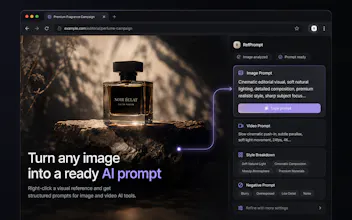
RefPrompt is a Chrome extension that turns any visual reference into structured prompts for AI image and video tools. Right-click an image, generate an image prompt, video prompt, style breakdown, negative prompt, and tool-ready presets for Midjourney, Runway, Kling, Veo, Pika, and more. Built for designers, ad creators, and AI creators who collect references and need better prompts fast.


Hey PH 🤝
I’m excited to launch RefPrompt — a Chrome extension for AI creators who use visual references every day.
The idea came from a simple problem: I was constantly saving references from websites, Pinterest, ads, product shots, and moodboards, but turning those visuals into actually useful prompts was still manual and slow.
RefPrompt makes that workflow much faster:
- Right-click any image in the browser
- Generate a detailed image prompt
- Get a video prompt for motion tools
- Break down style, lighting, camera, composition, mood, and textures
- Generate a negative prompt
- Copy tool-ready presets for Midjourney, Runway, Kling, Veo, Pika, ChatGPT Image, and more
The goal is simple: click → prompt → copy.
It’s built for designers, ad creators, video creators, marketers, and anyone using AI image/video tools with visual references.
I’d love your feedback:
What prompt formats or AI tools should RefPrompt support next?
@anton_tomilov1 happy to be one of your 10 Anton, i will run a product shot through it today. the thing i will be checking is per tool tailoring, does a Midjourney preset really differ from the Kling one or is it the same prompt relabeled? that is where the value sits.
@artem_fedorovich That’s a great point — and exactly what I want to validate.
The idea is not to relabel the same prompt: Midjourney should be more image/style/composition focused, while Kling should include motion, camera behavior and scene dynamics.
Would love to hear your honest take after you run the product shot through it.
Small update: RefPrompt is completely free while I’m testing it.
I’m looking for 10 PH makers, designers, and AI creators to try it with one image reference and tell me:
Did the right-click flow feel useful?
Which output is most valuable: image prompt, video prompt, style breakdown, negative prompt, or tool presets?
Which AI tool should I support better next — Midjourney, Runway, Kling, Veo, Pika, or something else?
I’ll use the feedback to ship the next update.